Poop Sheet

IBM “THINK” Sign

By Robert Laing

This website in its current form represents years of struggling with literate programming.

Let us change our traditional attitude to the construction of programs: Instead of imagining that our main task is to instruct a computer what to do, let us concentrate rather on explaining to human beings what we want a computer to do. — Donald Knuth.

Many decades ago, I used Knuth’s TeX typesetting system, or rather Leslie Lamport’s LaTeX derivation, to publish a book for a friend. It’s somewhat ironic that Knuth called his software documentation system (for Pascal, the programing language taught in a computer science course I did way back in the last century) Web, since it’s not web as in WWW friendly. Knuth’s software produces beautifully typeset pages for printing on paper, usually in pdf, whereas I want hypertext.

I’ve dabbled with a lot of web “Content Mangement Systems” over the years both in my job as a newspaper journalist and for my hobby events listing sites joeblog.co.za, seatavern.co.za, and many more, and have settled on Hugo, mainly because of its support for syntax highlighting.

Online learning is something that really excited me when it started, and I did some fantastic courses. One by Gregor Kiczales based on a free online textbook How to Design Programs really stressed the importance of test-driven development. The book’s design recipe is fairly similar to Agile, but places emphasis on documenting before you code.

The Agile cult seems to be anti-documentation, at least that’s the impression I got from a supposed guru in a youtube lecture saying: “People don’t read comments. Computers don’t read comments. So why bother with them?”

Comments and documentation have become intertwined through systems such as JavaScript’s JSDoc. Personally, I want the code embedded in the documentation, not vice-versa, which Hugo lets me do. As someone who jumps between programing languages a lot, I also don’t like having to learn a different documentation system for each language.

Testing to learn

The first thing I look for in documentation is examples. The web is a rich resource of these, and I’ve become a huge fan of a specialist search engine phind.com which trawls stackoverflow etc and somehow seems to find the good stuff.

To help remember what I’ve figured out so far, I’m keeping my shellspec “specification” files in the bash section of my Hugo documentation tree to get rendered on this website.

Testing as documentation

Writing is hard, and learning to write takes practice. No simple rules can ensure that you write good specs. One thing to avoid is using code. Code is a bad medium for helping to understand code. Architects don’t make their blueprints out of bricks. — Wired interview with Leslie Lamport

My theory why Unix took over the world is it what slipped onto the budget of a contract for the US patent office who needed a documentation syste. A side product was “man pages”, ie the system came documented, albeit very tersely.

The manual was intended for reference, not learning. Their gazillian options are listed alphabetically, not by how commonly they are used or importance. But they ultimately got us to the web.

As I’m struggling with now, all these “power tools” are not as simple as would be nice, but as a touch typist, what would take days with a GUI takes milliseconds with a CLI if you know how.

Testing as specification

Programmers who advocate writing tests before writing code often believe those tests can serve as a specification. Writing tests does force us to think, and anything that gets us to think before coding is helpful. However, writing tests in code does not get us thinking above the code level. Who Builds a House Without Drawing Blueprints?, an article written by Leslie Lamport

Behavior-driven development systems such as Jasmine for JavaScript and ShellSpec for Bash prefer the jargon specification to tests. Personally, I use a subdirectory called tests rather than specs for my Jasmine and ShellSpec scripts.

unit

[Unit]

This is common to all unit types. It contains metadata about the service such as a description.

systemd.unit(5)

/usr/lib/systemd/system/nginx.service

[Unit]
Description=nginx web server
After=network-online.target remote-fs.target nss-lookup.target
Wants=network-online.target

/usr/lib/systemd/system/postgresql.service

[Unit]
Description=PostgreSQL database server
Documentation=man:postgres(1)
After=network.target network-online.target
Wants=network-online.target

/usr/lib/systemd/system/tmp.mount

[Unit]
Description=Temporary Directory /tmp
Documentation=https://systemd.io/TEMPORARY_DIRECTORIES
Documentation=man:file-hierarchy(7)
Documentation=https://systemd.io/API_FILE_SYSTEMS
ConditionPathIsSymbolicLink=!/tmp
DefaultDependencies=no
Conflicts=umount.target
Before=local-fs.target umount.target
After=swap.target

grep

grep me no patterns and I’ll tell you no lines. — fortune cooky

manual

wikibooks

As explained in The Unix Programing Environment by Brian Kernighan and Rob Pike, sed can do just about everything grep can.

sed -n '/pattern/p' files

is the same as

grep -h pattern files

Why do we have both sed and grep? After all, grep is just a simple special case of sed. Part of the reason is history — grep came well before sed. But grep survives, indeed thrives, because for the job that they both do, it is significantly easier to use than sed is.

appending

Following from iteration, the next step is to add JSON objects to the version converted to bash.

#!/bin/bash

source /usr/local/lib/json-utils.sh

ExampleGroup 'append new JSON object to an array'

  Example 'add another "workPerformed" object'
    declare -A myarr
    json2array myarr "$(< ../musicevent.json)"
    json1='{
      "@type": "CreativeWork",
      "name": "Sinfonia da Requiem",
      "sameAs": "https://en.wikipedia.org/wiki/Sinfonia_da_Requiem"
    }'
    array_append myarr '"workPerformed"' "$json1"
    When call array2json myarr
    The output should equal '{
  "@context": "https://schema.org",
  "@type": "MusicEvent",
  "location": {
    "@type": "MusicVenue",
    "address": "220 S. Michigan Ave, Chicago, Illinois, USA",
    "name": "Chicago Symphony Center"
  },
  "name": "Shostakovich Leningrad",
  "offers": {
    "@type": "Offer",
    "availability": "https://schema.org/InStock",
    "price": "40",
    "priceCurrency": "USD",
    "url": "/examples/ticket/12341234"
  },
  "performer": [
    {
      "@type": "MusicGroup",
      "name": "Chicago Symphony Orchestra",
      "sameAs": [
        "http://cso.org/",
        "http://en.wikipedia.org/wiki/Chicago_Symphony_Orchestra"
      ]
    },
    {
      "@type": "Person",
      "image": "/examples/jvanzweden_s.jpg",
      "name": "Jaap van Zweden",
      "sameAs": "http://www.jaapvanzweden.com/"
    }
  ],
  "startDate": "2014-05-23T20:00",
  "workPerformed": [
    {
      "@type": "CreativeWork",
      "name": "Britten Four Sea Interludes and Passacaglia from Peter Grimes",
      "sameAs": "http://en.wikipedia.org/wiki/Peter_Grimes"
    },
    {
      "@type": "CreativeWork",
      "name": "Shostakovich Symphony No. 7 (Leningrad)",
      "sameAs": "http://en.wikipedia.org/wiki/Symphony_No._7_(Shostakovich)"
    },
    {
      "@type": "CreativeWork",
      "name": "Sinfonia da Requiem",
      "sameAs": "https://en.wikipedia.org/wiki/Sinfonia_da_Requiem"
    }
  ]
}'
    The status should be success
    The error should be blank
  End


End

Style Guides

Block, Element, Modifier

github

Tutorials

/* Block component */
.btn {}

/* Element that depends upon the block */ 
.btn__price {}

/* Modifier that changes the style of the block */
.btn--orange {} 
.btn--big {}

https://css-tricks.com/bem-101/

https://google.github.io/styleguide/htmlcssguide.html

https://blog.logrocket.com/5-things-to-consider-when-creating-your-css-style-guide-7b85fa70039d/

https://cssguidelin.es/

Templates

Not

By Robert Laing

Lets turn the query “Which students applied for ‘CS’?” around, again using Stanford University dean Jennifer Widom’s basic SQL examples using her college applications data.

Which students have not applied for CS?

A trap many people will fall into is to rewrite the σMajor = ‘CS’(Apply) selection to not equal, editing it into something like σMajor != ‘CS’(Apply).

That would return the set for not ‘CS’ as {123, 234, 345, 678, 765, 876}. Recalling that the students who applied for ‘CS’ were {123, 345, 543, 876, 987}, we see we shouldn’t have {123, 345, 876} in our result. The reason those students match Major <> 'CS' is student 123 also applied for ‘EE’, 345 applied for ‘EE’ and ‘bioengineering’ besides ‘CS’, while 876 applied for ‘biology’ and ‘marine biology’ besides ‘CS’.

Or

By Robert Laing

Once again, lets use Stanford University dean Jennifer Widom’s basic SQL examples from her college applications data as an illustration, modifying the same SQL examples done in conjunction as “which students applied for ‘CS’ and ‘EE’?”.

Which students applied for ‘CS’ or ‘EE’?

As with conjunction’s p ∧ q being a spiky version of set theory’s P ∩ Q, disjunction’s p ∨ q is a spiky version of set theory’s P ∪ Q.

And

By Robert Laing

Once again, lets use Stanford University dean Jennifer Widom’s basic SQL examples from her college applications data as an illustration.

Which students applied for ‘CS’ and ‘EE’?

In what I’ve called copula notation, conjunction is written p ∧ q, which is a handy mnemonic that its set equivalent is P ∩ Q. That logic has a spiky version of set theory’s rounded symbol we’ll also encounter in disjunction and implication.

service

[Service]

systemd.service(5)

/usr/lib/systemd/system/nginx.service

[Service]
Type=forking
PIDFile=/run/nginx.pid
PrivateDevices=yes
PrivateTmp=true
SyslogLevel=err

ExecStart=/usr/bin/nginx
ExecReload=/usr/bin/nginx -s reload
Restart=on-failure
KillMode=mixed
KillSignal=SIGQUIT
TimeoutStopSec=5

/usr/lib/systemd/system/postgresql.service

[Service]
Type=notify
TimeoutSec=120
User=postgres
Group=postgres

Environment=PGROOT=/var/lib/postgres

SyslogIdentifier=postgres
PIDFile=/var/lib/postgres/data/postmaster.pid
RuntimeDirectory=postgresql
RuntimeDirectoryMode=755

ExecStartPre=/usr/bin/postgresql-check-db-dir ${PGROOT}/data
ExecStart=/usr/bin/postgres -D ${PGROOT}/data
ExecReload=/bin/kill -HUP ${MAINPID}
KillMode=mixed
KillSignal=SIGINT

# Due to PostgreSQL's use of shared memory, OOM killer is often overzealous in
# killing Postgres, so adjust it downward
OOMScoreAdjust=-200

# Additional security-related features
PrivateTmp=true
ProtectHome=true
ProtectSystem=full
NoNewPrivileges=true
ProtectControlGroups=true
ProtectKernelModules=true
ProtectKernelTunables=true
PrivateDevices=true
RestrictAddressFamilies=AF_UNIX AF_INET AF_INET6
RestrictNamespaces=true
RestrictRealtime=true
SystemCallArchitectures=native

systemd.exec(5)

sed

Manual

Four types of sed scripts

1. Multiple Edits to the Same File

2. Making Changes Across a Set of Files

3. Extracting Contents of a File

4. Edits To Go

Substitute [address]s/regexp/replacement/[flags]

The ‘s’ command (as in substitute) is probably the most important in ‘sed’ and has a lot of different options. The syntax of the ‘s’ command is ’s/REGEXP/REPLACEMENT/FLAGS'.

The ‘/’ characters may be uniformly replaced by any other single character within any given ‘s’ command.

Difference

By Robert Laing

Lets start by repeating the example in not, however using SQL’s EXCEPT operator, which ties into set theory’s P - Q.

In relational algebra, the query we want is ΠsID(Student) - ΠsIDMajor = ‘CS’(Apply)).

Note that relational algebra involving different tables/sets requires them to be projected into a shared type of compound data structure. Here I’m keeping things simple by only working with their common column sID. In fill values I’ll go into the complexities that negation sometimes causes because of missing columns.

Union

Intersection

By Robert Laing

Which majors intersect?

Lets return to Venn’s 5 relations. Here we want to check A ∩ B ≠ Ø, which is true for any of the first four relations.

venn-relations2.svg

We need a self-join for this query, which is a form of intersection.

SELECT DISTINCT a1.major AS A, a2.major AS B
FROM apply as a1, apply as a2
WHERE a1.sid = a2.sid
ORDER BY A, B;
       a        |       b        
----------------+----------------
 bioengineering | bioengineering
 bioengineering | CS
 bioengineering | EE
 biology        | biology
 biology        | CS
 biology        | marine biology
 CS             | bioengineering
 CS             | biology
 CS             | CS
 CS             | EE
 CS             | marine biology
 EE             | bioengineering
 EE             | CS
 EE             | EE
 history        | history
 history        | psychology
 marine biology | biology
 marine biology | CS
 marine biology | marine biology
 psychology     | history
 psychology     | psychology
(21 rows)

Note everything intersects with itself. To remove all the A ≡ A along with A ∩ B so B ∩ A reciprocal intersections, we could add a a1.major < a2.major test:

Fill Values

By Robert Laing

The problem of how to deal with unknown values for logical variables led to the development of three-valued logic, which SQL implemented with NULL, and Prolog with unset variables.

Which students have not made any college applications yet?

In preparation of outer joins, lets here do the portion called an antijoin

Student ▷ Apply

Our basic goal here is to find the set {456, 567, 654, 789}.

college-classes.svg

In the example so far involving both the Student and Apply tables — “Which students have not applied for CS?” — I sidestepped the problem that the student table has columns sID, sName, GPA and sizeHS while Apply has columns sID, cName, major and decision by projecting both to their single common column, SID.

Outer Join

By Robert Laing

As explained in inner join relational algebra uses various bowtie symbols to describe binary operations on two tables, which are anologous to combining two sets as I’ll try to explain in this diagram.

P - Q P ∩ Q Q - P P Q

The P ∩ Q portion could be considered inner join P ⋈ Q. A left outer join P ⟕ Q is (P - Q) ∪ (P ∩ Q), a right outer join P ⟖ Q is (P ∩ Q) ∪ (Q - P), and a full outer join P ⟗ Q is (P - Q) ∪ (P ∩ Q) ∪ (Q - P).

Inner Join

By Robert Laing

Relational algebra uses various bowtie symbols to describe binary operations on two tables, which are anologous to combining two sets as I’ll try to explain in this diagram.

P - Q P ∩ Q Q - P P Q

The above illustrates what relational algebra calls a full outer join which combines three parts, the inner or natural join P ⋈ Q which equates to P ∩ Q, and what this section covers, flanked by left and right antijoins P ▷ Q which equats to P - Q, and Q ▷ P which equats to Q - P.

De Morgan's Law

By Robert Laing

What I took to calling copula notation because I read somewhere that the ∧ and ∨ symbols are called copulas (but I can’t find the reference again) is a handy mnemonic for remembering two substitution rules commonly called De Morgan’s Laws:

  1. ¬(p ∧ q) can be substituted with ¬p ∨ ¬q
  2. ¬(p ∨ q) can be substituted with ¬p ∧ ¬q

There’s an interesting relationship with set theory in that

Sum

By Robert Laing

In 1863 William Stanley Jevons wrote to George Boole that surely Boole’s operation of addition should be replaced by the more natural ‘inclusive or’ (or ‘union’), leading to the law X+X=X. Boole completely rejected this suggestion (it would have destroyed his system based on ordinary algebra) and broke off the correspondence.The Algebra of Logic Tradition
pqp + q
111
101
011
000

As can be seen from the above quote, that 1 + 1 = 1 in logic arithmetic caused rancour between the field’s founding fathers, and does to this day. Jevons used a rotated ÷ symbol, ⋅∣⋅, for or instead of + to sidestep the problem.

Product

By Robert Laing

2 Value Algebra

Since conjunction is closely associated with the word and, it jarred me a bit to discover that it is logic’s equivalent of multiplication, while disjunction — commonly thought of as or — is logic’s addition, the arithmetic operator I associate with and.

Why conjunction equates to multiplication is best illustrated by its truth table:

pqp · q
111
100
010
000

Moving from binary to any number of propositions, the universal quantification symbol ∀(p) tends to be used, as in

cycles-with-tabling

By adding arc(k, e). we alter the previous example in Transitive Closures to this:

tree_cycle.svg

Unless guarded against, this will cause tc(a, X). to never escape looping between k and e. Thanks to a relatively recent addition to SWI Prolog Tabled execution, all that’s needed to avoid this is adding one line of code prolog:- table tc/2. to that previously shown in TransitiveClosures.

:- table tc/2.

arc(a, b).
arc(a, c).
arc(a, d).
arc(b, e).
arc(b, f).
arc(c, g).
arc(c, h).
arc(c, i).
arc(d, j).
arc(e, k).
arc(f, l).
arc(f, m).
arc(h, n).
arc(i, o).
arc(i, p).
arc(j, q).
arc(j, r).
arc(j, s).
arc(k, e).
arc(m, t).

tc(X, Y) :-
    arc(X, Y).

tc(X, Z) :-
    arc(X, Y),
    tc(Y, Z).

Tabling changes the order of traversal returned by tc(a, X) to this:

Parallel

Series

By Robert Laing

Flow Control

Yet another way to think of logic is as electrical switches, where on is true and off is false. Here conjunction is switches in series, and disjunction is switches in parallel.

p q r s

If any switch in series is not on (such as switch r in the above diagram), it breaks the flow of electric current, meaning a light or whatever the circuit powers would be off. If the switches were in parallel, (which I’ll illustrate in disjunction), any on switch would put the circuit on.

iterative-deepening

By Robert Laing

A snag we hit in puzzle solving is the graph isn’t handily prestored in a database for route finding using transitive closures with infinite loop protection thanks to cycles with tabling. We have to turn to what’s sometimes called generative recursion to dynamically build our graph as we explore it. For this, we’ll return to the techniques introduced in BreadthDepthFirst.

We’ll be using iterative deepening depth-first search which gets depth first to mimic breadth first by doing it repeatedly, lengthening its depth-limit one step at a time. The reason is unbounded depth first instead of finding the shortest route, finds the leftmost route. Breadth first does find the shortest route, but even the cheap RAM available on modern computers is often insufficient for it to complete this task.

auto

Auto = read.csv("Auto.csv", header = T, na.strings = "?", stringsAsFactors = T)

polynomials

https://www.khanacademy.org/test-prep/v2-sat-math/x0fcc98a58ba3bea7:advanced-math-easier/x0fcc98a58ba3bea7:polynomial-and-other-nonlinear-graphs-easier/e/v2-polynomial-and-other-nonlinear-graphs-1

\(f(x)=3x^3 - 7x^2 + 9x - 4\)

poly1 <- function(x) {
  y = 3 * x^3 - 7 * x^2 + 9 * x - 4
  return(y) 
}
svg("poly1.svg", width = 11, pointsize = 12, family = "sans")
curve(poly1, from = -3, to = 3, n = 40)
abline(h = 0)
abline(v = 0)
abline(h = -4, col = "red")
dev.off()

Polynomial graph

\(f(x)=2x^3 - 2x^2 + 18x - 18\)

poly2 <- function(x) {
  y = 2 * x^3 - 2 * x^2 + 18 * x - 18
  return(y) 
}
svg("poly2.svg", width = 11, pointsize = 12, family = "sans")
curve(poly2, from = -3, to = 3, n = 40)
abline(h = 0)
abline(v = 0)
abline(v = 1, col = "red")
dev.off()

Second poly

‍ ‍‍\(y = (4x - 1)(x + 1)(x + 2) + 5)\)

advertising

p 121

This is the first linear regression example from Statistical Learning covered in Chapter 2 and 3.

Linear Regression vs K-Nearest Neighbors

7 Questions

  1. Is there a relationship between sales and advertising budget?
  2. How strong is the relationship?
  3. Which media are associated with sales?
  4. How large is the association between each medium and sales?
  5. How accurately can we predict future sales?
  6. Is the relationship linear?
  7. Is there synergy among the advertising media?
Advertising = read.csv("Advertising.csv", header = T, na.strings = "?", stringsAsFactors = T)
head(Advertising)
  X    TV radio newspaper sales
1 1 230.1  37.8      69.2  22.1
2 2  44.5  39.3      45.1  10.4
3 3  17.2  45.9      69.3   9.3
4 4 151.5  41.3      58.5  18.5
5 5 180.8  10.8      58.4  12.9
6 6   8.7  48.9      75.0   7.2
Advertising = read.csv("Advertising.csv", header = T, na.strings = "?", stringsAsFactors = T)
svg("advertising1.svg", width = 11, pointsize = 12, family = "sans")
plot(sales ~ TV, data = Advertising, col = 2, xlab = "$1000", ylab = "Units Sold")
abline(lm(formula = sales ~ TV, data = Advertising), col = 2)
text(x = 10, y = 7.032594, "7.032594")
points(sales ~ radio, data = Advertising, col = 3)
abline(lm(formula = sales ~ radio, data = Advertising), col = 3)
text(x = 10, y = 9.31164, "9.31164")
points(sales ~ newspaper, data = Advertising, col = 4)
abline(lm(formula = sales ~ newspaper, data = Advertising), col = 4)
text(x = 10, y = 12.35141, "12.35141")
legend("bottomright", legend = c("TV", "Radio", "Newspaper"), fill = c(2,3,4))
dev.off()

linear relations

iris

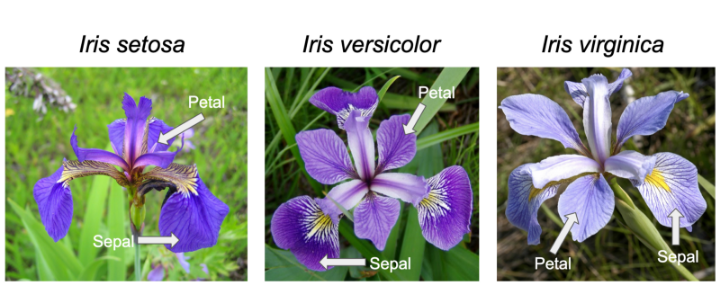
Iris Flower Classification

Iris is one of the databases built into R (ie it can be accessed without loading), and used by Learn R through examples among others to teach the basics.

Other built-in datasets include:

The data() function provides the full list.

Scatterplot

iris$speciesID <- as.numeric(iris$Species) + 1
iris$shape <- ifelse(iris$Sepal.Length < 5.15, 17, 20)
svg("petal-width-length1.svg", width = 11, pointsize = 12, family = "sans")
plot(Petal.Length ~ Petal.Width, data = iris, col = speciesID, pch = shape)
legend("topleft", levels(iris$Species), fill = 2:4)
dev.off()

Petal width to length scatterplot

credit

> Credit = read.csv("Credit.csv", header = T, na.strings = "?", stringsAsFactors = T)
> head(Credit)
   Income Limit Rating Cards Age Education Own Student Married Region Balance
1  14.891  3606    283     2  34        11  No      No     Yes  South     333
2 106.025  6645    483     3  82        15 Yes     Yes     Yes   West     903
3 104.593  7075    514     4  71        11  No      No      No   West     580
4 148.924  9504    681     3  36        11 Yes      No      No   West     964
5  55.882  4897    357     2  68        16  No      No     Yes  South     331
6  80.180  8047    569     4  77        10  No      No      No  South    1151

To get the correlation of “Own”, “Student”, “Married”, and “Region”, these need to be converted to dummy columns with numbers.

house-prices

This is another learning example offered by Kaggle.

The object is to predict SalePrice which is provided in train.csv, but missing in test.csv. The submission should just have two columns, Id and SalePrice.

train <- read.csv("train.csv", header = T, na.strings = "?", stringsAsFactors = T)
ncol(train)

There are 81 columns, so an overhwelming number.

Qualitative Summary

summary(train$MSZoning)
C (all)      FV      RH      RL      RM 
     10      65      16    1151     218 

summary(train$Id)

“MSSubClass” “MSZoning” “LotFrontage”
[5] “LotArea” “Street” “Alley” “LotShape”
[9] “LandContour” “Utilities” “LotConfig” “LandSlope”
[13] “Neighborhood” “Condition1” “Condition2” “BldgType”
[17] “HouseStyle” “OverallQual” “OverallCond” “YearBuilt”
[21] “YearRemodAdd” “RoofStyle” “RoofMatl” “Exterior1st”
[25] “Exterior2nd” “MasVnrType” “MasVnrArea” “ExterQual”
[29] “ExterCond” “Foundation” “BsmtQual” “BsmtCond”
[33] “BsmtExposure” “BsmtFinType1” “BsmtFinSF1” “BsmtFinType2” [37] “BsmtFinSF2” “BsmtUnfSF” “TotalBsmtSF” “Heating”
[41] “HeatingQC” “CentralAir” “Electrical” “X1stFlrSF”
[45] “X2ndFlrSF” “LowQualFinSF” “GrLivArea” “BsmtFullBath” [49] “BsmtHalfBath” “FullBath” “HalfBath” “BedroomAbvGr” [53] “KitchenAbvGr” “KitchenQual” “TotRmsAbvGrd” “Functional”
[57] “Fireplaces” “FireplaceQu” “GarageType” “GarageYrBlt”
[61] “GarageFinish” “GarageCars” “GarageArea” “GarageQual”
[65] “GarageCond” “PavedDrive” “WoodDeckSF” “OpenPorchSF”
[69] “EnclosedPorch” “X3SsnPorch” “ScreenPorch” “PoolArea”
[73] “PoolQC” “Fence” “MiscFeature” “MiscVal”
[77] “MoSold” “YrSold” “SaleType” “SaleCondition” [81] “SalePrice”

titanic

Introductory Example

Kaggle provides a training set (which includes the result, Survived, along with various predictors), a test set which doesn’t include Survived, and a simple example gender_submission.csv to show how results should be submitted.

Writing submission file

The model used for gender_submission.csv is all female passengers survived and all male passengers didn’t.

test <- read.csv("test.csv", header = T, na.strings = "?", stringsAsFactors = T)
test$Survived <- as.integer(test$Sex == "female")
write.csv(test[,c("PassengerId","Survived")], "submission.csv", quote = F, row.names = F)

Checking accuracy of “all females lived, all males died” assumption.

train <- read.csv("train.csv", header = T, na.strings = "?", stringsAsFactors = T)
train$Prediction <- as.integer(train$Sex == "female")
(sum(train$Survived == train$Prediction)/nrow(train)) * 100

On the training data, this assumption gives 78.67565% accuracy.

wage

Ordering boxplots

Ordered By Marital Status

Base plot

Wage = read.csv("Wage.csv", header = T, na.strings = "?", stringsAsFactors = T)
new_order <- with(Wage, reorder(maritl , wage, median , na.rm=T))
svg("ordered-maritl.svg", width = 11, pointsize = 12, family = "sans")
plot(new_order, Wage$wage)
dev.off()

Ordered boxplot

ggplot2

library(ggplot2)
Wage = read.csv("Wage.csv", header = T, na.strings = "?", stringsAsFactors = T)
new_order <- with(Wage, reorder(maritl , wage, median , na.rm=T))
svg("ordered-maritl-ggplot2.svg", width = 11, pointsize = 12, family = "sans")
ggplot(data = Wage, mapping = aes(x = new_order, y = wage)) + 
  geom_boxplot(fill = c(2, 3, 7, 4, 8), alpha = 0.2) +
  xlab("Marital Status") +
  ylab("Wage")
dev.off()

Ordered boxplot

Finding variable of interest

x must be a numeric vector

data

Hugo allows data in a variety of formats to sourced from several different places.

Global data is typically stored in the /data subdirectory.

Local data uses .Resources.Get which reads files in the current bundle, not be confused with resources.Get which fetches global resources.

JSON unmarshal and remarshal

  {{ $schema := dict }}
  {{ with .Resources.Get "schema.json" }}
    {{ with . | transform.Unmarshal }}
      {{ $schema = . }}
    {{ end }}
  {{ end }}
  <pre>{{ transform.Remarshal "json" $schema }}</pre>

JSON types once marshalled

Object
map[string]interface {} Can be tested with reflect.IsMap
Array
[]interface {} Can be tested with reflect.IsSlice
String
string
Number
float64
Null
nil

curl

curl https://sowhereto.today
curl: (60) SSL: no alternative certificate subject name matches target hostname 'sowhereto.today'
More details here: https://curl.se/docs/sslcerts.html
curl -k https://sowhereto.today

getopts

#!/usr/bin/bash

: << COMMENTS
Examples taken from https://zerotomastery.io/blog/bash-getopts/
COMMENTS


ExampleGroup 'getopts'

  Example 'getopts with options that require arguments'
    function eg1 {
      while getopts "u:p:" opt; do
        case $opt in
          u) echo "username=${OPTARG}" ;;
          p) echo "password=${OPTARG}" ;;
          *) echo "Error: Invalid option";;
        esac
      done
    }
    When call eg1 -u "Alice" -p "1234"
    The output line 1 should match pattern "username=Alice"
    The output line 2 should match pattern "password=1234"
  End

  Example 'getopts with option that requires no argument'
    function eg2 {
      while getopts "u:p:h" opt; do
        case $opt in
          u) echo "username=${OPTARG}" ;;
          p) echo "password=${OPTARG}" ;;
          h) echo "Help: This script accepts -u <username>, -p <password> and -h for help.";;
          *) echo "Error: Invalid option";;
        esac
      done
    }
    When call eg2 -h
    The output should match pattern "Help: This script accepts -u <username>, -p <password> and -h for help."
  End

  Example 'getopts with invalid option'
    function eg3 {
      while getopts "u:p:" opt; do
        case $opt in
          u) echo "username=${OPTARG}" ;;
          p) echo "password=${OPTARG}" ;;
          *) echo "Error: Invalid option";;
        esac
      done
    }
    When call eg3 -z
    The output should match pattern "Error: Invalid option"
    The error should include "illegal option -- z"
  End

  Example 'leading : supresses error and puts missing option into OPTARG'
    function eg4 {
      while getopts ":u:p:" opt; do
        case $opt in
          u) echo "username=${OPTARG}" ;;
          p) echo "password=${OPTARG}" ;;
          *) echo "Error: Invalid option -${OPTARG}";;
        esac
      done
    }
    When call eg4 -z
    The output should match pattern "Error: Invalid option -z"
  End

End

https://argbash.dev/

heredocs

#!/usr/bin/bash

# MultiLine Comments With HereDoc using the no-op command (:).
: << COMMENTS
As you may already know, Bash does not support multi-line comments. 
Using heredoc, you can create multi-line comments by redirecting the block of code to the no-op command (:).

The no-op is bash built-in which takes the input and returns exit code zero. 
You can consider this as a synonym to the bash built-in "true" which also exits exit code zero.
COMMENTS


ExampleGroup 'heredocs'

  Example 'Printing MultiLine String Using HereDoc'
    function eg1() {
cat << EOF
Something is wrong with the input file received for today.
Contact the downstream team to get it corrected.
==> SLA MISSED <==
EOF
    }
    When call eg1
    The output line 1 should match pattern "Something is wrong with the input file received for today."
    The output line 2 should match pattern "Contact the downstream team to get it corrected."
    The output line 3 should match pattern "==> SLA MISSED <==" 
  End

  Example 'Tab Suppression In HereDoc'
    function eg2() {
cat <<- EOF
		Something is wrong with the input file received for today.
		Contact the downstream team to get it corrected.
		==> SLA MISSED <==
EOF
    }
    When call eg2
    The output line 1 should match pattern "Something is wrong with the input file received for today."
    The output line 2 should match pattern "Contact the downstream team to get it corrected."
    The output line 3 should match pattern "==> SLA MISSED <==" 
  End


End

loops

#!/usr/bin/bash

# shellcheck disable=SC2317

ExampleGroup 'loops'

  Example 'while Evaluate and iterate'
    function loop1() {
      NUM=5
      while (( NUM > 0 ))
      do
        printf "Value of NUM = %s \n" "$NUM"
        ((--NUM))
      done
      return 0
    }
    When call loop1
    The output line 1 should match pattern "Value of NUM = 5 "
    The output line 2 should match pattern "Value of NUM = 4 "
    The output line 3 should match pattern "Value of NUM = 3 " 
    The output line 4 should match pattern "Value of NUM = 2 "
    The output line 5 should match pattern "Value of NUM = 1 "
  End

  Example 'until Evaluate and iterate'
    function loop1() {
      NUM=5
      until (( NUM == 0 ))
      do
        printf "Value of NUM = %s \n" "$NUM"
        ((--NUM))
      done
      return 0
    }
    When call loop1
    The output line 1 should match pattern "Value of NUM = 5 "
    The output line 2 should match pattern "Value of NUM = 4 "
    The output line 3 should match pattern "Value of NUM = 3 " 
    The output line 4 should match pattern "Value of NUM = 2 "
    The output line 5 should match pattern "Value of NUM = 1 "
  End

  Example 'As above with for and range'
    loop1() {
      for NUM in {5..1}
      do
        printf "Value of NUM = %s \n" "$NUM"
      done
      return 0
    }
    When call loop1
    The output line 1 should match pattern "Value of NUM = 5 "
    The output line 2 should match pattern "Value of NUM = 4 "
    The output line 3 should match pattern "Value of NUM = 3 " 
    The output line 4 should match pattern "Value of NUM = 2 "
    The output line 5 should match pattern "Value of NUM = 1 "
  End

  Example 'Internal field separator (IFS) default'
    loop1() {
      var1="foo:bar foo bar"
      for val in $var1
      do
        printf '%s\n' "$val"
      done 
    }
    When call loop1
    The output line 1 should match pattern "foo:bar"
    The output line 2 should match pattern "foo"
    The output line 3 should match pattern "bar"
  End

  Example 'Internal field separator (IFS) set to colon'
    loop1() {
      var1="foo:bar foo bar"
      IFS=':'
      for val in $var1
      do
        printf '%s\n' "$val"
      done 
    }
    When call loop1
    The output line 1 should match pattern "foo"
    The output line 2 should match pattern "bar foo bar"
  End

  Example 'Read file using while loop'
    loop1() {
while read -r line
do
  echo "$line"
done <<< "14:00,Brighton,Leicester
14:00,West Ham,Man Utd
16:30,Spurs,Chelsea"
    }
    When call loop1
    The output line 1 should match pattern "14:00,Brighton,Leicester"
    The output line 2 should match pattern "14:00,West Ham,Man Utd"
    The output line 3 should match pattern "16:30,Spurs,Chelsea"
  End

  Example 'Read CSV file, allocating column names, using while loop'
    loop1() {
while IFS="," read -r time team1 team2
do
  echo "$team1 is playing against $team2 at $time"
done <<< "14:00,Brighton,Leicester
14:00,West Ham,Man Utd
16:30,Spurs,Chelsea"
    }
    When call loop1
    The output line 1 should match pattern "Brighton is playing against Leicester at 14:00"
    The output line 2 should match pattern "West Ham is playing against Man Utd at 14:00"
    The output line 3 should match pattern "Spurs is playing against Chelsea at 16:30"
  End

End

redirection

Redirection

What is a File descriptor?

#!/usr/bin/bash

ExampleGroup 'Redirection'

  fd2() { echo "err" >&2; }

  Example 'Standard input (stdin) is file descriptor 0'
    When call ls -l /dev/stdin
    The path /dev/stdin should be symlink
    The word 11 of stdout should eq "/proc/self/fd/0"
    The output should include "/proc/self/fd/0"
  End

  Example 'Standard output (stdout) is file descriptor 1'
    When call ls -l /dev/stdout
    The path /dev/stdin should be symlink
    The word 11 of stdout should eq "/proc/self/fd/1"
    The output should include "/proc/self/fd/1"
  End

  Example 'Standard error (stderr) is file descriptor 2'
    When call ls -l /dev/stderr
    The path /dev/stdin should be symlink
    The word 11 of stdout should eq "/proc/self/fd/2"
    The output should include "/proc/self/fd/2"
  End

  Example 'uses the stderr as the subject'
    When call fd2
    The stderr should eq "err"
  End

  Example 'has an alias "error"'
    When call fd2
    The error should eq "err"
  End

  Example 'ls error from missing file'
    When call ls -l spec/examples_spec.sh 'not-here.txt'
    The output should include "spec/examples_spec.sh"
    The status should be failure
    The stderr should eq "ls: cannot access 'not-here.txt': No such file or directory"
  End

End

search-and-replace

#!/usr/bin/bash

shopt -s extglob

ExampleGroup 'Search and replace'

  Example '${parameter/pattern/string} The first occurrence of pattern will be replaced by string.'
    str="linux is awesome to work with."
    When call echo "${str/linux/LINUX}"
    The output should eq "LINUX is awesome to work with."
  End

  Example 'unescaped & replaces & with matched string'
    var=abcdef
    When call echo ${var/abc/& }
    The output should eq "abc def"
  End

  Example 'escaped & keeps symbol'
    var=abcdef
    When call echo ${var/abc/\& }
    The output should eq "& def"
  End

  Example 'double quoted & also keeps symbol'
    var=abcdef
    When call echo ${var/abc/"& "}
    The output should eq "& def"
  End

End

trimming

After trying to figure things out myself, I worked through the examples in the Pure Bash Bible where I encountered lots of syntax I’d never seen before.

#!/bin/bash

trim_string() {
    # Usage: trim_string "   example   string    "
    : "${1#"${1%%[![:space:]]*}"}"
    : "${_%"${_##*[![:space:]]}"}"
    printf '%s\n' "$_"
}


trim_string "    Hello,  World    "

First off, there’s the leading colon. An answer to What is the purpose of the : (colon) GNU Bash builtin?

A useful application for : is if you’re only interested in using parameter expansions for their side-effects rather than actually passing their result to a command.

filter

FILTER can be combined with an aggregate expression.

SELECT city, count(*) FILTER (WHERE temp_lo < 45), max(temp_lo)
FROM weather
GROUP BY city;
SELECT count(*) AS unfiltered, count(*) FILTER (WHERE i < 5) AS filtered
FROM generate_series(1,10) AS s(i);

FILTER is much like WHERE, except that it removes rows only from the input of the particular aggregate function that it is attached to. Here, the count aggregate counts only rows with temp_lo below 45; but the max aggregate is still applied to all rows, so it still finds the reading of 46. — Aggregate Functions

game

Game

{
  "@context": "https://schema.org",
  "@type": "Game",
  "offers":{
    "@type":"Offer",
    "priceCurrency":"$",
    "price":"17.99",
    "availableAtOrFrom":"/monopoly-2/en_US/shop/where-to-buy.cfm?brand_guid=DAD28866-1C43-11DD-BD0B-0800200C9A66&prodName=Monopoly%20Game"
  },
  "audience":{
    "@type":"PeopleAudience",
    "suggestedMinAge":"8"
  },
  "description":"Own it all as a high-flying trader in the fast-paced world of real estate. Tour the city for the hottest properties: sites, stations and utilities are all up for grabs. Invest in houses and hotels, then watch the rent come pouring in! Make deals with other players and look out for bargains at auction. There are many ways to get what you want. For really speedy dealers, use the speed die for a quick and intense game of Monopoly. So get on Go and trade your way to success!",
  "gameItem":["gameboard","8 tokens","Title Deed cards","16 Chance cards", "16 Community Chest cards","money pack","32 houses","12 hotels"],
  "numberOfPlayers":{
    "@type":"QuantitativeValue",
    "minValue":"3",
    "maxValue":"5"
  },
  "copyrightHolder":"Hasbro"
}

set

explain

show

This is a synomym for SELECT current_setting ( setting_name text [, missing_ok boolean ] ).

SHOW

SHOW log_destination;

SHOW logging_collector;

read-write-conflicts

Understanding locks

7 tips for dealing with locks

Something I learnt the hard way by getting the computer to play games over-and-over and then update the average scores each time was it crashed my Postgresql functions with

ERROR:  relation "_states" does not exist
LINE 1: SELECT id FROM _states WHERE state = NULL

The problem was garbage values were getting returned from queries if their table was being updated, and the solution was:

shebang

wikipedia

The first line of shell scripts is most commonly written without a space, ie #!/usr/bash however in the examples of O’Reilly’s sed & awk book it’s written #! /bin/sh

According to this stackoverflow post

The shebang (#!) is a 16-bit kernel-interpreted magic “number” (actually 0x23 0x21). Thereafter, the kernel program loader (following the exec-family call) attempts to execute the remainder of the line to handle the remainder of the containing file’s content. Many, if not most modern kernels disregard preceding spaces to the command that follows the shebang. As such, #! /bin/bash, #! /usr/bin/perl, and the like, should be acceptable with most modern kernels. That said, a shebang with no following space is far more commonly seen.

microdata

deletion

#!/bin/bash

source /usr/local/lib/json-utils.sh

ExampleGroup 'delete objects or array elements'

  Example 'delete "location"'
    declare -A myarr
    json2array myarr "$(< ../musicevent.json)"
    del_key myarr '"location"'
    When call array2json myarr
    The output should equal '{
  "@context": "https://schema.org",
  "@type": "MusicEvent",
  "name": "Shostakovich Leningrad",
  "offers": {
    "@type": "Offer",
    "availability": "https://schema.org/InStock",
    "price": "40",
    "priceCurrency": "USD",
    "url": "/examples/ticket/12341234"
  },
  "performer": [
    {
      "@type": "MusicGroup",
      "name": "Chicago Symphony Orchestra",
      "sameAs": [
        "http://cso.org/",
        "http://en.wikipedia.org/wiki/Chicago_Symphony_Orchestra"
      ]
    },
    {
      "@type": "Person",
      "image": "/examples/jvanzweden_s.jpg",
      "name": "Jaap van Zweden",
      "sameAs": "http://www.jaapvanzweden.com/"
    }
  ],
  "startDate": "2014-05-23T20:00",
  "workPerformed": [
    {
      "@type": "CreativeWork",
      "name": "Britten Four Sea Interludes and Passacaglia from Peter Grimes",
      "sameAs": "http://en.wikipedia.org/wiki/Peter_Grimes"
    },
    {
      "@type": "CreativeWork",
      "name": "Shostakovich Symphony No. 7 (Leningrad)",
      "sameAs": "http://en.wikipedia.org/wiki/Symphony_No._7_(Shostakovich)"
    }
  ]
}'
    The status should be success
    The error should be blank
  End

  Example 'delete "performer",1,'
    declare -A myarr
    json2array myarr "$(< ../musicevent.json)"
    del_key myarr '"performer",1,'
    When call array2json myarr
    The output should equal '{
  "@context": "https://schema.org",
  "@type": "MusicEvent",
  "location": {
    "@type": "MusicVenue",
    "address": "220 S. Michigan Ave, Chicago, Illinois, USA",
    "name": "Chicago Symphony Center"
  },
  "name": "Shostakovich Leningrad",
  "offers": {
    "@type": "Offer",
    "availability": "https://schema.org/InStock",
    "price": "40",
    "priceCurrency": "USD",
    "url": "/examples/ticket/12341234"
  },
  "performer": [
    {
      "@type": "MusicGroup",
      "name": "Chicago Symphony Orchestra",
      "sameAs": [
        "http://cso.org/",
        "http://en.wikipedia.org/wiki/Chicago_Symphony_Orchestra"
      ]
    }
  ],
  "startDate": "2014-05-23T20:00",
  "workPerformed": [
    {
      "@type": "CreativeWork",
      "name": "Britten Four Sea Interludes and Passacaglia from Peter Grimes",
      "sameAs": "http://en.wikipedia.org/wiki/Peter_Grimes"
    },
    {
      "@type": "CreativeWork",
      "name": "Shostakovich Symphony No. 7 (Leningrad)",
      "sameAs": "http://en.wikipedia.org/wiki/Symphony_No._7_(Shostakovich)"
    }
  ]
}'
    The status should be success
    The error should be blank
  End

End

defaults

Much of my project involves checking if the provided JSON data has needed key-value pairs, and if missing deciding whether to simply skip (which Bash confused me by calling continue in a loop), or salvaging the entry by figuring out if the required data can be obtained from other entries.

ExampleGroup 'from https://www.gnu.org/software/bash/manual/html_node/Shell-Parameter-Expansion.html'
# also https://opensource.com/article/17/6/bash-parameter-expansion

  Example 'Basic form ${parameter}'
    foo="bar"
    When call echo "${foo}" # brackets are unecessary in this example
    The output should eq "bar"
  End

  Example 'default value of unset variable is empty string'
    When call echo "${foo}"
    The output should eq ""
  End

  Example 'default value is substituted with ${parameter:-default}'
    When call echo "${foo:-default value}"
    The output should eq "default value"
  End

  Example 'default value is substituted with ${parameter:-default}'
    foo="bar"
    When call echo "${foo:-default value}"
    The output should eq "bar"
  End

  Example ':- doesn`t alter the variable`s value'
    echo "${foo:-default value}"
    When call echo "${foo}"
    The output should eq ""
  End

  Example 'Whereas := does'
    echo "${foo:=default value}"
    When call echo "${foo}"
    The output should eq "default value"
  End


End

slicing

https://kodekloud.com/blog/regex-shell-script/

https://zerotomastery.io/blog/bash-regex/

filename=someletters_12345_moreletters.ext
substring=${filename//@(+([a-z])_|_+([a-z]).*)}
echo $substring
12345

Bash is akin to JavaScript in that it has the equivalent of a string slice and an array slice which use similar notation.

The Bash manual calls these Substring Expansion, but I find JavaScript’s slice more descriptive. The Bash notation is:

${parameter:offset}
${parameter:offset:length}

String slices

Bash’s ${parameter:offset:length} differs from Javascript’s slice(indexStart, indexEnd) in that length=indexEnd-indexStart.

Something I wasn’t aware of was that when using negative offsets and “length”, Bash behaves excactly like Javascript. Negative lengths are actually offsets from the end.

transforming

I only discovered courtesy of ostechnix’s tutorial that Bash offers two ways of doing case conversion:

Lowercasing

${varname@L}

or

${varname,,}

ExampleGroup 'from https://www.gnu.org/software/bash/manual/html_node/Shell-Parameter-Expansion.html'
# also https://opensource.com/article/17/6/bash-parameter-expansion

# https://stackoverflow.com/questions/40732193/bash-how-to-use-operator-parameter-expansion-parameteroperator
  Example 'lower to upper ${parameter@U}'
    foo="bar"
    When call echo "${foo@U}"
    The output should eq "BAR"
  End

  Example 'lower to upper ${parameter^^}'
    foo="bar"
    When call echo "${foo^^}"
    The output should eq "BAR"
  End


  Example 'Title lower case ${parameter@u}'
    foo="bar"
    When call echo "${foo@u}"
    The output should eq "Bar"
  End

  Example 'Title lower case ${parameter^}'
    foo="bar"
    When call echo "${foo^}"
    The output should eq "Bar"
  End

  Example 'upper to lower ${parameter@L}'
    foo="BAR"
    When call echo "${foo@L}"
    The output should eq "bar"
  End

  Example 'upper to lower ${parameter,,}'
    foo="BAR"
    When call echo "${foo,,}"
    The output should eq "bar"
  End

  Example 'First letter to lower ${parameter,}'
    foo="BAR"
    When call echo "${foo,}"
    The output should eq "bAR"
  End

  Example 'Transpose case ${parameter~~}'
    foo="bAR"
    When call echo "${foo~~}"
    The output should eq "Bar"
  End

  Example 'Transpose first letter ${parameter~}'
    foo="bar"
    When call echo "${foo~}"
    The output should eq "Bar"
  End


  Example 'associative array JSON path'
    foo=""performer",0,"sameAs",0"
    When call echo "${foo}"
    The output should eq "performer,0,sameAs,0"
  End

  # Output to be reused as input of another command
  Example '${parameter@operator} Q'
    foo=""performer",0,"sameAs",0"
    When call echo "${foo@Q}"
    The output should eq "'performer,0,sameAs,0'"
  End

  Example '${parameter@operator} a'
    declare -A arr=(["foo"]="bar")
    When call echo "${arr@a}"
    The output should eq "A"
  End

  Example '${parameter@operator} K'
    declare -A arr=([""performer",0,"sameAs",0"]="bar")
    When call echo "${arr[@]@K}"
    The output should eq "performer,0,sameAs,0 \"bar\" "
  End

  Example '${parameter@operator} k'
    declare -A arr=([""performer",0,"sameAs",0"]="bar")
    When call echo "${arr[@]@k}"
    The output should eq "performer,0,sameAs,0 bar"
  End

End

indexed-arrays

#!/usr/bin/bash

# shellcheck disable=SC2016

ExampleGroup 'Indexed Arrays'

  Example 'How to initialize an indexed array in Bash'
    arr1=( one 2 three 4 )
    The variable arr1[0] should equal "one"
    The variable arr1[1] should equal "2"
    The variable arr1[2] should equal "three"
    The variable arr1[3] should equal "4"
  End

  Example 'How to view elements in an indexed array in Bash'
    arr1=( one 2 three 4 )
    When call echo "${arr1[0]}"
    The output should equal "one"
  End

  Example 'How to add values to an indexed array'
    arr1=()
    arr1[0]="one"
    arr1[1]="2"
    arr1[2]="three"
    arr1[3]="4"
    The variable arr1[0] should equal "one"
    The variable arr1[1] should equal "2"
    The variable arr1[2] should equal "three"
    The variable arr1[3] should equal "4"
  End

  Example 'How to append elements to an indexed array in Bash'
    arr1=( one 2 three 4 )
    arr1+=( five 6 )
    The variable arr1[0] should equal "one"
    The variable arr1[1] should equal "2"
    The variable arr1[2] should equal "three"
    The variable arr1[3] should equal "4"
    The variable arr1[4] should equal "five"
    The variable arr1[5] should equal "6"
  End


  Example 'find the length of an array'
    arr1=( one 2 three 4 )
    When call echo "${#arr1[@]}"
    The output should equal 4
  End

  Example 'Remove an element from an array'
    arr1=( one 2 three 4 )
    unset 'arr1[1]'
    The variable arr1[0] should equal "one"
    The variable arr1[1] should be undefined
    The variable arr1[2] should equal "three"
    The variable arr1[3] should equal "4"
  End

  Example 'take a slice of an array using ${varname[@]:index:length}'
    arr1=( one 2 three 4 )
    When call echo "${arr1[@]:1:2}"
    The output should equal "2 three"
  End


End

Something I’ve found a lot harder than it should be is converting JSON arrays to bash “indexed” (as in not associative) arrays.

iteration

Iterating over JSON arrays via Bash associative-arrays requires two more functions to the json-utils to json2array and array2json in the top section.

A basic form of itereratino is getkeys which returns the keys from any given level of the path. It will work for objects and arrays.

function getkeys {
  local -n arr
  arr=$1
  local keys
  keys=$(for key in "${!arr[@]}"; do
    if [[ $key =~ $2 ]]; then
      echo "$key"
    fi
  done | sort -u)
  if [[ -z $keys ]]; then 
    echo "Error: $2 is not a valid key" >&2
    return 1;
  fi
  echo "$keys"
}

The return 1 part is something I had to add after my initial attempt as I got more familiar with the “logic programing” style of bash, to move to an alternative block of code if the function doesn’t receive a valid key, which could create the key or whatever.

wolf-goat-cabbage

This was my first attempt at illustrating graph traversal using an animated pgn. Instructions on how I did this below.

The animation is made out of 8 png files generated by graphviz’s dot as in dot -T png -o frame7.png frame7.dot. These then were combined into an animated png file using apngasm.

apngasm frame0.png frame1.png frame2.png frame3.png frame4.png frame5.png frame6.png frame7.png -d 1000 -o cgw.png

My main lesson from creating this diagram was utility values have direction, ie the utility of a node needs to be stored in the graph table with the parent and move, not just with the node itself. This is because the graph is full of cycles, and to avoid the automaton going back, the utility of going back to a node needs to be less than going forward.

buttons-and-lights

This is a simple example puzzle translated from a kif file into SWI Prolog. The full code is on Swish where the query route(Actions) gives two answers

  • Actions = [does(robot, a), does(robot, b), does(robot, c), does(robot, a), does(robot, b), does(robot, a)]
  • Actions = [does(robot, a), does(robot, b), does(robot, a), does(robot, c), does(robot, b), does(robot, a)]

The puzzle consists of three lights labeled p, q, and r, each of which can be on or off, giving us 8 possible states (provided we ignore the state’s step counter). The player moves from state to state by pressing one of three buttons, labelled a, b, or c and the object is to get to the final state with 6 button presses.

menus

Directory traversal

I’ve developed my own homegrown way of recursively walking a Hugo site’s content tree as described in this discourse thread since the official way of putting the menu in the site config file isn’t what I want as I add and remove pages.

With more experience, I changed the deprecated template with an inline partial

My code for layouts/partials/menu.html looks like this:

<nav>
{{ partial "inline/walk.html" (dict "dir" .Site.Home.Pages) }}

{{ define "partials/inline/walk.html" }}
  <ol>
  {{ range .dir }}
    {{ if (eq .BundleType "branch") }}
        <li><a href="{{ .RelPermalink }}">{{ .Title }}</a>
        {{ partial "inline/walk.html" (dict "dir" .Pages) }}
        </li>
    {{ else }}
      <li><a href="{{ .RelPermalink }}">{{ .Title }}</a></li>
    {{ end }}
  {{ end }}
  </ol>
{{ end }}
</nav>

Section menu

Hugo’s default menu system requires everything to be manually entered into the system configuration file.

date

#!/usr/bin/bash

ExampleGroup 'date examples'

  ExampleGroup '"2023-12-12T07:30:00Z" format as supplied by quicket needs TZ set correctly'

    Example '"2023-12-12T07:30:00Z" with TZ=UTC as on server'
      When call echo $(TZ=UTC date -d "2023-12-12T07:30:00Z" +%Y-%m-%dT%H:%M:%S+02:00)
      The output should equal '2023-12-12T07:30:00+02:00'
      The status should be success
      The error should be blank
    End

    Example '"2023-12-12T07:30:00Z" with TZ=Africa/Johannesburg as on laptop'
      When call echo $(TZ=Africa/Johannesburg date -d "2023-12-12T07:30:00Z" +%Y-%m-%dT%H:%M:%S+02:00)
      The output should equal '2023-12-12T09:30:00+02:00'
      The status should be success
      The error should be blank
    End

  End

  Example '"2023-12-12T09:30:00+02:00" should remain unchanged'
    When call echo $(TZ=Africa/Johannesburg date -d "2023-12-12T09:30:00+02:00" +%Y-%m-%dT%H:%M:%S+02:00)
    The output should equal '2023-12-12T09:30:00+02:00'
    The status should be success
    The error should be blank
  End

  ExampleGroup '"11 Dec 2023 09:00" format as supplied by webtickets ignores TZ'

    Example '"11 Dec 2023 09:00" with unset TZ'
      When call date -d "11 Dec 2023 09:00" +%Y-%m-%dT%H:%M:%S+02:00
      The output should equal '2023-12-11T09:00:00+02:00'
      The status should be success
      The error should be blank
    End

    Example '"11 Dec 2023 09:00" with TZ=UTC as on server'
      When call echo $(TZ=UTC date -d "11 Dec 2023 09:00" +%Y-%m-%dT%H:%M:%S+02:00)
      The output should equal '2023-12-11T09:00:00+02:00'
      The status should be success
      The error should be blank
    End

    Example '"11 Dec 2023 09:00" with TZ=Africa/Johannesburg as on laptop'
      When call echo $(TZ=Africa/Johannesburg date -d "11 Dec 2023 09:00" +%Y-%m-%dT%H:%M:%S+02:00)
      The output should equal '2023-12-11T09:00:00+02:00'
      The status should be success
      The error should be blank
    End

    Example '"11 Dec 2023" ie missing time will default to midnight'
      When call date -d "11 Dec 2023" +%Y-%m-%dT%H:%M:%S+02:00
      The output should equal '2023-12-11T00:00:00+02:00'
      The status should be success
      The error should be blank
    End

  End

  ExampleGroup 'Webtickets formats that date cannot process'

    Example '"09 & 12 December 2023" needs to be rewritten for date'
      When call date -d "09 & 12 December 2023" +%Y-%m-%dT%H:%M:%S+02:00
      The status should be failure
      The error should be present
    End

    Example '"12th - 13th December 2023" needs to be rewritten for date'
      When call date -d "12th - 13th December 2023" +%Y-%m-%dT%H:%M:%S+02:00
      The status should be failure
      The error should be present
    End

    Example '"15th December 2023" needs to be rewritten for date'
      When call date -d "15th December 2023" +%Y-%m-%dT%H:%M:%S+02:00
      The status should be failure
      The error should be present
    End

  End

End

The primary reason I’m using bash rather than some programing language is to get easy access to GNU’s powerful date program. It automagically reads most text descriptions of dates and can then translate them to what I want, which is ISO 8601 as specified by schema.org.

tree

man page

Before I discovered the tree command, I wasted huge amounts of time manually making grapic directory listings.

$ tree ~/webapps/frontiersoftware
/home/roblaing/webapps/frontiersoftware
├── archetypes
│   └── default.md
├── assets
├── config
│   └── _default
│       └── hugo.json
├── content
│   ├── bash
│   │   ├── coreutils
│   │   │   ├── _index.md
│   │   │   └── sed
│   │   │       ├── index.md
│   │   │       └── spec
│   │   │           ├── basics_spec.sh
│   │   │           ├── deleting_lines_spec.sh
│   │   │           ├── inserting_lines_spec.sh
│   │   │           ├── printing_spec.sh
│   │   │           ├── spec_helper.sh
│   │   │           └── substitution_spec.sh
│   │   ├── extra
│   │   │   ├── _index.md
│   │   │   └── tree
│   │   │       └── index.md
│   │   ├── _index.md
│   │   └── util-linux
│   │       └── _index.md
│   ├── hugo
│   └── _index.md
├── data
├── i18n
├── layouts
│   ├── _default
│   │   ├── baseof.html
│   │   ├── list.html
│   │   └── single.html
│   └── shortcodes
│       └── insert-code.html
├── static
└── themes

21 directories, 19 files

Proofs

The contrapositive law

(p ⇒ q) ⇔ (¬q ⇒ ¬p)

Proof by Contradiction

(¬p ⇒ 0) ⇔ p

Equivalence to Truth

(p ≡ 1) ≡ p

Deduction

(E1 AND E2 AND · · · AND Ek) ⇒ E

Modus ponens

(p AND (p ⇒ q)) ⇒ q

Resolution

((p + q)(¬p + r)) → (q + r)

Gridcannon Tests

Contributor Covenant Code of Conduct

Our Pledge

In the interest of fostering an open and welcoming environment, we as contributors and maintainers pledge to making participation in our project and our community a harassment-free experience for everyone, regardless of age, body size, disability, ethnicity, gender identity and expression, level of experience, nationality, personal appearance, race, religion, or sexual identity and orientation.

Our Standards

Examples of behavior that contributes to creating a positive environment include:

Jasmine

A JavaScript Testing Framework

Jasmine is a Behavior Driven Development testing framework for JavaScript. It does not rely on browsers, DOM, or any JavaScript framework. Thus it’s suited for websites, Node.js projects, or anywhere that JavaScript can run.

Upgrading from Jasmine 4.x? Check out the upgrade guide.

Contributing

Please read the contributors’ guide.

Installation

There are several different ways to install Jasmine, depending on your environment and how you’d like to use it. See the Getting Started page for details.

How to work on a Jasmine Release

Development

Jasmine Core Maintainers Only

Follow the instructions in CONTRIBUTING.md during development.

Git Rules

Please attempt to keep commits to main small, but cohesive. If a feature is contained in a bunch of small commits (e.g., it has several wip commits or small work), please squash them when pushing to main.

Version

We attempt to stick to Semantic Versioning. Most of the time, development should be against a new minor version - fixing bugs and adding new features that are backwards compatible.

Jasmine Core 1.3.0 Release Notes

Summary

This version was a very incremental release that merged in some pull requests for bug fixes.

Features

  • HTML Runner exposes UI to not swallow Exceptions, instead raising as soon as thrown
  • Migrated homepage content to Wiki
  • Made a far more useful tutorial page
  • Added a toBeNaN matcher

Fixes

  • Better detection of in-browser vs. not
  • afterEach functions will run now even when there is a timeout
  • toBeCloseTo matcher is more accurate
  • More explicit matcher messages for spies
  • Better equality comparisons for regular expressions
  • Improvements to the Pretty Printer: controllable recursion depth, don’t include inherited properties
  • Fix where for was being used as a property on an object (failed on IE)

Jasmine Core 1.3.1 Release Notes

Summary

This release is for browser compatibility fixes

Changes

Features

Fixing test runner failures in IE 6/7/8

Jasmine Core 2.0.1 Release Notes

Summary

This release is for small bug fixes and enhancements ahead of a real-soon-now 2.1.

Changes

Features

  • NodeJS is now supported with a jasmine-core npm
  • Support browsers that don’t supply a Date.now() by having a mockDate object - Closes #361
  • Show message if no specs where loaded
  • When using jasmine.any, the class will now be included in the error message
  • Reporters now receive the number of passed expectations in a spec
  • Use default failure message for toBeNaN
  • Use the latest jasmine_selenium_runner so we use the fix for printing objects with cycles
  • Add jasmine logo image to HTML runner
  • Stop Jasmine’s CSS affecting the style of the body tag - Closes #600
  • Standardized location of the standalone distributions - they now live in the repo in /dist as well as on the Releases page

Bugs

  • Don’t allow calling the same done callback multiple times - Fixes #523
  • Remove ’empty’ as an option as a spec result as this was a breaking change
    • Instead, we determine if a spec has no expectations using the added key of passedExpectations in combination of the failedExpectations to determine that there a spec is ’empty'
  • Fix build in IE8 (IE8 doesn’t support Object.freeze)
  • Fix ObjectContaining to match recursively

Documentation

  • Update release doc to use GitHub releases
  • Add installation instructions to README - Merges #621
  • Add Ruby Gem and Python Egg to docs
  • Add detailed steps on how to contribute - Merges #580 from @pablofiu

Pull Requests and Issues

  • Contains is explicitly false if actual is undefined or null - Fixes #627
  • namespace html-reporter -> jasmine_html-reporter - Fixes #600
  • Throw a more specific error when expect is used without a currentSpec - Fixes #602
  • Reduced size of logo with PNG Gauntlet - Merges #588
  • HTML Reporter resets previous DOM when re-initialized - Merges #594 from @plukevdh
  • Narrow down raise exceptions query selector; Finding by any input tag is a little bit broad - Closes #605
  • Pass through custom equality testers in toHaveBeenCalledWith - Fixes #536
  • Fix outdated copyright year (update to 2014) - Merges #550 from @slothmonster
  • Add package.json to Python egg to get correct version number - Fixes #551
  • Allow users to set the maximum length of array that the pretty-printer will print out - Fixes #323 @mikemoraned and #374 @futuraprime
  • matchersUtil.equals() does not expect a matcher as its first argument, so send the “actual” value first and the “expected” value second. - Merges #538 from @cbandy
  • Add single quote check to jshint and fix src files for that - Closes #522
  • Remove an eval in order to support running jasmine within CSP - Closes #503
  • Allow matcher custom failure messages to be a function - Closes #520
  • More color blind friendly CSS from @dleppik - Closes #463 & #509
  • Use load-grunt-tasks Merges #521 from @robinboehm
  • Special case printing -0 - Closes #496
  • Allow stub or spy Date object safely using a closure to get a clean copy - Closes #506
  • Use \d7 instead of plain ‘x’ for more square appearance
  • Better support in pretty printer when an object has null prototype - Fixes #500
  • Update link at top of README to improve access to Jasmine 2.0 docs - Merges #486 from @nextmat
  • Force query selector to seek within the html-reporter element - Merges #479 from @shprink
  • Netbeans files are in gitignore - Merges #478 from @shprink

Release Notes generated with Anchorman

Release Notes

Summary

Changes

  • keep the files for running in a webpage around in the npm package
  • Expose files and paths necessary to embed jasmine in an html page for nodejs
  • Pull out the building of the jasmine interface so node and web both get the same one.
  • Show a dot with color of pending spec when no expectations
  • Console reporter prints out failed expectation’s message

Bugs

  • Allow mocked Date constructor to be called with a subset of full params

Pull Requests and Issues

  • a disabled suite should call resultCallback with status being disabled
  • disabled suite should still call onStart callback

_Release Notes generated with Anchorman

Jasmine Core 2.1.0 Release Notes

Summary

This is the release of Jasmine 2.1.

Features

  • Support for focused specs via fit and fdescribe
  • Support for beforeAll and afterAll
  • Support for an explicit fail function, both in synchronous and asynchronous specs
  • Allow custom timeout for beforeEach, afterEach, beforeAll, afterAll and it
  • Spies now track return values
  • Specs can now specify their own timeouts
  • Testing in Node.js via the official Jasmine Node Module
  • Spec results now have suiteResults method that behaves similarly to to specResults
  • HtmlReporter shows error alerts for afterAllExceptions

Bugs

  • CI now works for IE8 (this was releated to ConsoleReporter below)
  • Detect global object properly when getting the jasmine require obj

Deprecations

ConsoleReporter as part of Jasmine core

The Console Reporter exists nearly entirely for the old manner of running Jasmine’s own specs in node.js. As we are now supporting node.js officially, this reporter code no longer needs to be in this repo and instead will be in the Jasmine npm.

Jasmine Core 2.1.1 Release Notes

Summary

This is a hotfix release of jasmine core to fix a breaking change with events emitted by the top-level suite

Issues

  • Top-level suite triggers suiteStarted and suiteEnd to be consistent

_Release Notes generated with Anchorman

Jasmine Core 2.1.2 Release Notes

Summary

This is a hotfix release of jasmine core to fix a breaking change with reporting when all of the specs in a suite are pending.

Changes

  • Suites still run their children even if none are executable

_Release Notes generated with Anchorman

Jasmine Core 2.1.3 Release Notes

Summary

This release is primarily a bug-fix release to clean up some recent regressions.

Pull Requests & Issues

  • Top level suite no longer reports suiteStart and suiteDone

  • Don’t keep the expected and actual for a passed expectation

  • Use the new build env on Travis

    • Merges #712 from @joshk

_Release Notes generated with Anchorman

Jasmine Core 2.2.0 Release Notes

Changes

  • ObjectContaining no longer tries to track exact mismatches
  • HTML reporter keeps extra query params when focusing on a spec or suite
  • Check custom properties on Arrays when computing equality
  • Better error message if spyOn is called without a method name
  • Rename jasmineMatches to asymmetricMatch
  • Don’t double escape focus spec links
  • Jasmine equality checks if either side implements asymmetricMatch
  • Add asymmetric equality tester to match a string with a RegExp
  • Add jshint to node build on Travis for pull request builds
  • Restructure node examples directory to look more realistic

Pull Requests & Issues

  • Add a basic bower config

    Jasmine Core 2.2.1 Release Notes

    Summary

    This is a hotfix release to fix the packaging for bower

    Changes

    • Fix missing comma on bower.json
      • Merges #763 from @gabrielhpugliese
      • Merges #764 from @joshuacc

    _Release Notes generated with Anchorman

    Jasmine Core 2.3.0 Release Notes

    Changes

    • Style disabled specs in the results list
    • Use onclick directly to better support older webkit
    • Don’t use deprecated onComplete syntax for jasmine-npm
    • Allow the clock to be installed for the duration of a single closure
    • Add safari 7 & 8 to browser matrix
    • Remove unused standaloneBuilder var from Gruntfile
    • Add test script to package.json
    • Update bower.json keywords to match package.json keywords
    • Add keywords to package.json
    • refuse to execute an order if it would cause a suite with a beforeAll or afterAll to be re-entered after leaving once

    Pull Requests & Issues

    • Specify a main entry point for bower so it can be loaded easier

      Jasmine 2.3.1 Release Notes

      Summary

      This release is a packaging update for bower only.

      Pull Requests & Issues

      • Point Bower’s main field to jasmine.js, which is browser-friendly.
        • Merge #843 from @evoL

      _Release Notes generated with Anchorman

      Jasmine 2.3.2 Release Notes

      Summary

      This is a hotfix release to fix a regression with specs declared without a function body

      Pull Requests & Issues

      • A spec without a function provided should be pending not disabled

      _Release Notes generated with Anchorman

      Jasmine 2.3.3 Release Notes

      Summary

      This is a hotfix release to fix a regression with the execution context for beforeAll

      Pull Requests & Issues

      • Set the shared user context correctly when executing the top level suite

      _Release Notes generated with Anchorman

      Jasmine 2.3.4 Release Notes

      Summary

      This is a hotfix release to fix a regression with execution ordering

      Pull Requests & Issues

      • Fix ordering for suites with more than 11 direct children.

      • Update standalone installation instructions to reference the releases page

      • Remove dead CSS class styles

        • Merges #849 from @prather-mcs
        • Merges #848 from @prather-mcs
        • Fixes #847

      _Release Notes generated with Anchorman

      Jasmine Core 2.4.0 Release Notes

      Summary

      This release contains a number of fixes and pull requests. The most notable is probably that Jasmine now supports randomization of spec order

      Changes

      • Run jasmine’s specs in random order
      • Add support for returning run details for reporting randomness
      • Use className instead of class when creating DOM elements

      Pull Requests & Issues

      • Syntax highlighting in README.md

        • Merges #973 from @brunoqc
      • Added a throw error block in describe incase a function with arguments is passed in describe

        Jasmine Core 2.4.1 Release Notes

        Changes

        • Run afterEach in reverse order declared as before

        _Release Notes generated with Anchorman

        Jasmine 2.5.0 Release Notes

        Summary

        This release contains a number of fixes and pull requests.

        Changes

        • Rename j$ to jasmineUnderTest for specs
          • Please update any pull requests to simplify merging, thanks.

        Pull Requests & Issues

        • Prettyprint objects whose constructors have custom toString method

        • Add gulp-jasmine-browser link to readme

        • Exclude lib directory from codeclimate

        • Add instructions for testing in IE

          • Merges #1170 from @benchristel
        • Update devDependencies and fix issues from this

          Jasmine 2.5.1 Release Notes

          Pull Requests & Issues

          • fallback on assignment when a spy cannot be deleted

          • Fix issue with equality of Arrays in PhantomJS

          • Properly tick date along with clock


          _Release Notes generated with Anchorman

          Jasmine 2.5.2 Release Notes

          Pull Requests & Issues

          • Allow currently registered reporters to be cleared

          • Use isFunction to check for functionness in callFake


          _Release Notes generated with Anchorman

          Jasmine 2.6.0 Release Notes

          Summary

          This release contains a number of fixes and pull requests.

          Pull Requests & Issues

          Updating introduction url to last version

          • Merges #1316 from @rachelcarmena
          • Throw a recognizable Error message when fail outside of a spec.

          • Allow the matcher provide a custom error message

          • Fix the order in which afterAll hooks are run to match afterEach

          • Add matchers for positive and negative infinity

            Jasmine 2.6.1 Release Notes

            Summary

            This is a patch release to fix some regressions in the 2.6.0 release

            Pull Requests & Issues

            • Update README.md to make installation instructions more version-agnostic

              • Merges #1319 from @reinrl
            • Check for process.listeners as well, for GlobalErrors

              • Fixes #1333
            • allow explicit undefined as function for it and xit

              • Merges #1329 from @UziTech
              • Fixes #1328
            • remove eval to create spy wrapper

              • Merges #1330 from @UziTech
              • Fixes #1325
            • iterate through keys with a regular for loop

              Jasmine 2.6.2 Release Notes

              Summary

              This is a patch release to fix some regressions and performance problems in the 2.6.0 release

              Changes

              • Clear the stack if onmessage is called before the previous invocation finishes

                • Fixes #1327
                • Fixes jasmine/gulp-jasmine-browser#48
              • Correctly route errors that occur while a QueueRunner is clearing stack

                • Merges #1352 from @sgravrock
                • Fixes #1344
                • Fixes #1349
              • Don’t mask errors that occur when no handlers are installed

                • Merges #1347 from @sgravrock

              _Release Notes generated with Anchorman

              Jasmine 2.6.3 Release Notes

              Summary

              This is a patch release to fix some regressions and performance problems in the 2.6.0 release

              Changes


              _Release Notes generated with Anchorman

              Jasmine 2.6.4 Release Notes

              Summary

              This is a patch release to fix some regressions and performance problems in the 2.6.0 release

              Changes


              _Release Notes generated with Anchorman

              Jasmine 2.7.0 Release Notes

              Summary

              This release contains a number of fixes and pull requests.

              Pull Requests & Issues

              • Add class UserContext

                • Merges #1400 from @darthjee
              • Send unfocused tests through the same queue as focused tests

                • Merges #1399 from @jberney
              • PrettyPrinter allows an object to have a toString that isn’t a function

              • Fix rounding in toBeCloseTo

              • When stop on failure is enabled, skip subsequent it() and beforeEach(). Note: afterEach() functions are still run, because skipping them is highly likely to pollute specs that run after the failure.

                Jasmine 2.8.0 Release Notes

                Summary

                This release contains a number of fixes and pull requests. 2.8 should be the last 2.x release of Jasmine, as we aim for 3.0.

                Changes

                • Create CODE_OF_CONDUCT.md
                • Add jsdocs for reporter events
                • Update jsApiReporter docs to link to new suite and spec results
                • Add explicit docs for the callback function passed to it etc.
                • Update afterAll documentation

                Pull Requests & Issues

                • Add ’nothing’ matcher and tests

                  Jasmine 2.9 Release Notes

                  Summary

                  This release contains a number of fixes and pull requests.

                  Changes

                  • Fixed DelayedFunctionScheduler IE 8 compatibility issue
                  • Fixed SPEC HAS NO EXPECTATIONS warning in HTML reporter
                  • Correctly remove spies of window.onerror on IE
                  • Truncate pretty printer output that is more than j$.MAX_PRETTY_PRINT_CHARS long
                  • Reduced pretty printer limits to much smaller values
                  • Update contributing for new naming of jasmineUnderTest
                  • Allowed async functions to be passed into spy#callFake

                  Pull Requests & Issues

                  • Added complete support for Set also for IE11.

                    Jasmine Core 2.9.1 Release Notes

                    Summary

                    This is a hotfix release to fix a breaking change from the 2.9.0 release

                    Changes

                    • Clear timeouts when starting to process a milli instead of at the end
                      • Fixes #1482

                    _Release Notes generated with Anchorman

                    Jasmine-Core 2.99 Release Notes

                    Summary

                    This release is part of the upgrade path to Jasmine 3.0. It deprecates some functionality that will change.

                    Changes

                    • Add ability to report deprecation warnings from within the suite and display them in the HTML reporter
                    • Add deprecation messages for things that will change/break in 3.0
                      • done for async functionality will now add a failure if it is invoked with an Error
                      • Env.catchExceptions and the query param are going away, in favor of a more fully functional fail fast handler
                      • jasmine.Any(Object) will no longer match null
                      • Unhandled errors during suite load will be caught and reported as failures by Jasmine
                      • Calling execute more than once on the same spec will definitely fail in 3.0

                    _Release Notes generated with Anchorman

                    Jasmine Core 2.0 Release Notes

                    Summary

                    These notes are for Jasmine Core 2.0.

                    Breaking Changes

                    The introduction.js page covers the current syntax, highlighting the changes. Here are the known interface changes that are not backwards compatible with 1.x.

                    • New syntax for asynchronous specs
                    • New syntax for spies
                    • New interface for reporters
                    • Better Equality testing
                    • Replaced custom matchers for ease of use
                    • Change to toThrow matcher
                    • Clock now remains installed when a spec finishes
                    • More Jasmine internal variables/functions have been moved into closures

                    New syntax for asynchronous specs

                    Similar to Mocha, Jasmine befores, specs, and afters can take an optional done callback in order to force asynchronous tests. The next function, whether it’s a before, spec or after, will wait until this function is called or until a timeout is reached.

                    Jasmine-Core 3.0 Release Notes

                    Summary

                    Jasmine 3.0 is a major release of Jasmine, and as such includes some breaking changes in addition to various new features.

                    There is also a 2.99 release of Jasmine that will present deprecation warnings for suites that will encounter different behavior in 3.0.

                    Breaking Changes

                    • Replace old “catch exceptions” logic with proper fail fast with error reporting

                    • Detect an Error passed to done and add an expectation failure

                      Jasmine-Core 3.1 Release Notes

                      Summary

                      This release contains a number of fixes and pull requests

                      Pull Requests and Issues

                      • Display error properties for failed specs

                        • Merges #1516 from @jbunton-atlassian
                      • Allow node to report load time errors

                      • Fixing missing semi-colons

                        • Merges #1512 from @Sylhare
                      • Fixed release notes link

                      • Added matchers: truthy, falsy, empty and notEmpty

                        • Merges #1460 from @sjolicoeur
                      • Add API docs for async reporters

                      • Return for functions that have no actual words between keyword and (

                        Jasmine Core 3.10 Release Notes

                        New features and bug fixes

                        • Added support for running Jasmine multiple times

                          • If the env is configured with autoCleanClosures: false, then it can be executed repeatedly.
                          • Merges #1934 from @nicojs
                          • Fixes #1925
                        • Improved error message when an async expectation occurs after the spec finishes

                          • Merges #1937 from @AndreWillomitzer
                          • Fixes #1854
                        • Reject timeout values that are too large for setTimeout

                          • See #1930
                        • Don’t immediately move to the next queueable fn on async error

                          Jasmine Core 3.10.1 Release Notes

                          Bugfixes

                          • Fixed missing pendingReason in pending spec results

                          _Release Notes generated with Anchorman

                          Jasmine-Core 3.2 Release Notes

                          Summary

                          This release contains a number of fixes and pull requests

                          Changes

                          • Add spyOnAllFunctions function

                          • Improve timeout error message

                            • Merges #1567 from @ikonst
                          • Fix JSDoc naming for Env functions

                          • Add documentation for more public functions on Env

                          • Added a basic set of async matchers

                          • Properly cascade StopExecutionError’s up the tree

                          • Implemented hiding of disabled specs

                            • Merges #1561 from @SamFare
                          • Line-break long expectation failure messages

                            Jasmine-Core 3.2.1 Release Notes

                            Changes

                            • Correctly expose spyOnAllFunctions

                            _Release Notes generated with Anchorman

                            Jasmine Core 3.3 Release Notes

                            Summary

                            This release includes a new way to configure Jasmine, the ability to provide additional context with your expectations, and other things

                            Changes

                            • Added expect().withContext() to provide additional information in failure messages

                            • Implement withContext for async expectations too

                            • New asynchronous matcher toBeRejectedWith

                            • Show a tip for toBe failures for how to get deep equality

                            • expectAsync now works with non-native promises

                              Jasmine Core 3.4 Release Notes

                              Summary

                              This is a maintenance release of Jasmine with a number of new features and fixes

                              Changes

                              • Handle WebSocket events in IE when detecting Errors

                              • bump dependencies for security fixes

                                • Merges #1672 from @wood1986
                              • Make node execution default and override for browsers

                              • feat(result.duration): report test duration in ms

                              • refactor(Timer): share htmlReporter noopTimer via Timer.js

                                • Merges #1669 from @johnjbarton
                              • Fix various typos

                                Jasmine Core 3.5 Release Notes

                                Summary

                                This is a maintenance release of Jasmine with a number of new features and fixes

                                Highlights

                                • The output of toHaveBeenCalledWith should now be more readable

                                This breaks each call out onto its own line, so that it’s much easier to see where each call starts and how they differ. E.g. previously the output would be:

                                Expected spy foo to have been called with [ 'bar', 'baz', 'qux' ] but actual calls were [ [ 42, 'wibble' ], [ 'bar' 'qux' ], [ 'grault '] ]
                                

                                Now it’s:

                                Jasmine Core 3.6 Release Notes

                                Summary

                                This is a maintenance release of Jasmine with a number of new features and fixes.

                                Highlights

                                • Added support for custom object formatters

                                • Don’t require matchers and asymmetric equality testers to pass custom object formatters back to Jasmine

                                  • Supports custom object formatters.
                                  • Makes it easier to write high quality matchers and asymmetric equality testers.
                                  • The old API will still work until 4.0.
                                • Properly import jasmineRequire object before using

                                  Jasmine Core 3.7 Release Notes

                                  Summary

                                  This is a maintenance release of Jasmine with a number of new features and fixes.

                                  New features and bug fixes

                                  • Allow custom object formatters to be added in beforeAll

                                  • Allow specs to disable Jasmine’s global error handling by overwriting onerror.

                                    • Merges #1860 from @greghuc
                                  • Fixed comparison between URL objects

                                  • Added support for stack traces created by node --enable-source-maps with tools like the Typescript compiler.

                                    Jasmine Core 3.7.1 Release Notes

                                    Summary

                                    This is a bug fix release of Jasmine. It’s identical to 3.7.0 except that it correctly reports its version number. Please see the 3.7.0 release notes if you’re upgrading directly from 3.6.0 or earlier.

                                    Jasmine Core 3.8 Release Notes

                                    Summary

                                    This is a maintenance release of Jasmine with a number of new features and fixes.

                                    Python deprecation

                                    The Jasmine packages for Python are deprecated. We intend to continue releasing them through the end of the 3.x series, but after that they will be discontinued. We recommend migrating to the following alternatives:

                                    • The jasmine-browser-runner npm package to run specs in browsers, including headless Chrome and Saucelabs. This is the most direct replacement for the jasmine server and jasmine ci commands provided by the jasmine Python package.
                                    • The jasmine npm package ( npm install jasmine) to run specs under Node.js.
                                    • The standalone distribution from the latest Jasmine release to run specs in browsers with no additional tools.
                                    • The jasmine-core npm package if all you need is the Jasmine assets. This is the direct equivalent of the jasmine-core Python package.

                                    New features and bug fixes

                                    • Fixed spec filtering in Karma

                                      Jasmine Core 3.9 Release Notes

                                      New features and bug fixes

                                      • Fixed Trusted Types error in j$.isError_ in Chromium-based browsers

                                      • Better reporting of unhandled promise rejections with truthy but non-Error reasons on Node

                                      • Env#execute returns a promise in environments that support promises

                                      • Renamed failFast and oneFailurePerSpec config props to stopOnSpecFailure and stopSpecOnExpectationFailure

                                        The new names are more self-explanatory and consistent with jasmine-npm. The old names are deprecated but will still work until the next major release.

                                        Jasmine Core 3.99.0 Release Notes

                                        Summary

                                        This release adds deprecation warnings for breaking changes that will be introduced in Jasmine 4.0. Please see the migration guide for more information.

                                        This is the last planned release of jasmine-core for Ruby or Python. Versions 4.0 and later will be offered only via NPM and the standalone distribution.


                                        _Release Notes generated with Anchorman

                                        Jasmine Core 3.99.1 Release Notes

                                        This release fixes a bug in 3.99.0, which incorrectly reported a deprecation warning when a promise returned from a function passed to it, beforeEach, etc was resolved to a value.

                                        Supported environments

                                        jasmine-core 3.99.1 has been tested in the following environments.

                                        Environment Supported versions
                                        Node 10, 12, 14, 16
                                        Safari 10-14
                                        Chrome 98
                                        Firefox 97, 78, 68
                                        Edge 98
                                        Internet Explorer 10, 11

                                        _Release Notes generated with Anchorman

                                        Jasmine Core 4.0.0 Release Notes

                                        Summary

                                        This is a major release. In addition to new features and bug fixes it contains a number of breaking changes that are intended to diagnose common errors, improve awkward or outdated APIs, and make Jasmine easier to maintain and contribute to. If you’re upgrading from Jasmine 3.x, we recommend installing 3.99 and fixing any deprecation warnings that it emits before updating to 4.0. Please see the migration guide for more information. If you use the jasmine or jasmine-browser-runner NPM packages, please read the release notes for those packages as well.

                                        Jasmine Core 4.0.1 Release Notes

                                        This release fixes a bug in 4.0.0, which incorrectly reported a failure when a promise returned from a function passed to it, beforeEach, etc was resolved to a value.

                                        Supported environments

                                        jasmine-core 4.0.1 has been tested in the following environments.

                                        Environment Supported versions
                                        Node 12.17+, 14, 16
                                        Safari 14-15
                                        Chrome 98
                                        Firefox 91, 97
                                        Edge 98

                                        _Release Notes generated with Anchorman

                                        Jasmine 4.1.0 Release Notes

                                        New Features and Bug Fixes

                                        • toBeCloseTo treats Infinity and -Infinity as close to themselves

                                        • Replaced uses of deprecated String.prototype.substr()

                                          • Merges #1962 from @CommanderRoot
                                        • Removed obsolete vendor-specific background-size CSS rules

                                        • Added toHaveSpyInteractions matcher

                                        • Pretty-print [new String("")] as “[ ’’ ]”, not “[]”

                                        • Fixed cloning of Date objects in Spy#calls#saveArgumentsByValue

                                        • Include the name of the suite in the empty suite error message

                                          Jasmine 4.1.1 Release Notes

                                          Summary

                                          This release fixes several bugs involving equality comparison of properties with Symbol keys.

                                          Bug fixes

                                          • Fixes for crash bugs and output problems when comparing objects with Symbol keys

                                            • Include symbol properties in matcher diffs
                                            • Fixed exception when comparing arrays with Symbol keys
                                            • Include symbol properties in matcher diffs
                                            • Include symbol keys when pretty-printing objects
                                            • Fixes #1966
                                          • Exclude non-enumerable symbol properties from equality comparison

                                            • Merges #1963 from @suke

                                          Supported environments

                                          jasmine-core 4.1.1 has been tested in the following environments.

                                          Jasmine 4.2.0 Release Notes

                                          New Features

                                          • Added a jasmine.is asymmetric equality tester
                                            • Allows the use of === comparisons for specific fields of an object that should otherwise be compared with the default deep value equality logic.

                                          Bug Fixes

                                          • More reliably report errors that occur late in the suite/spec lifecycle

                                            • Previously, an error that occurred after Jasmine started to report the suiteDone or specDone event for the current runable would not be reliably reported. Now such an error is reported on the nearest ancestor suite whose suiteDone event has not yet been reported.
                                          • Don’t report a deprecation when a runnable uses two forms of async

                                            Jasmine 4.3.0 Release Notes

                                            New Features

                                            Documentation updates

                                            • Updated the README to reduce redundancy and update support links

                                            Internal improvements

                                            • Split Env into several smaller classes
                                            • Replaced uses of var with const/let
                                            • Replaced most uses of self = this with arrow fns
                                            • Removed obsolete and unused utility fns
                                            • Separated reporter- and runable-specific queue runner configuration
                                            • Added more test coverage for default spy strategies
                                            • Converted integration specs to async/await

                                            Supported environments

                                            jasmine-core 4.3.0 has been tested in the following environments.

                                            Jasmine 4.4.0 Release Notes

                                            Changes

                                            • Optimized the process of transitioning between specs in Node, Safari, and Edge. This change reduces the run time of jasmine-core’s own test suite by 50-70% in Node, about 20% in Edge, and 75-90% in Safari. Your results may vary. In general, suites with many fast specs will see the greatest performance improvement.

                                            • Removed old code to support browsers that don’t provide addEventListener/removeEventListener.

                                            Supported environments

                                            jasmine-core 4.4.0 has been tested in the following environments.

                                            Jasmine 4.5.0 Release Notes

                                            New Features

                                            • Added Safari 16 to supported browsers
                                            • Include inner exceptions in stack traces

                                            Bug Fixes

                                            • Report exceptions thrown by a describe before any it calls
                                            • Coerce the random string to a seed before sending it to reporters
                                              • This fixes an error in HTMLReporter when the configured seed is a number rather than a string, which has been allowed since 3.8.0

                                            Documentation updates

                                            • Fixed the jsdoc types of SuiteResult and SpecResult ids
                                            • Replaced var with const in API doc examples
                                            • Updated the style of the examples that are included in jasmine-core

                                            Internal improvements

                                            • Converted TreeProcessor to async/await
                                            • Converted ReportDispatcher to promises

                                            Supported environments

                                            jasmine-core 4.5.0 has been tested in the following environments.

                                            Jasmine Core 4.6.0 Release Notes

                                            New Features

                                            • Report the ID of each suite/spec’s parent
                                            • Report the path/url of the file that the spec/suite was defined in
                                            • Added Firefox 102 (current ESR) to supported browsers

                                            Internal improvements

                                            • Pinned sass to 1.58.3 for compatibility with Node 12
                                            • Pinned eslint-plugin-compat to <4.1.0 for compatibility with Node 12
                                            • Pinned Grunt to <1.6.0 for compatibility with Node 12

                                            _Release Notes generated with Anchorman

                                            Jasmine Core 4.6.1 Release Notes

                                            Summary

                                            This is a one-time backport of bug fixes from 5.x, for the benefit of Karma users who may not be aware that they’re still using 4.x.

                                            No further 4.x releases are planned. If possible, you should upgrade to the latest 5.x instead of 4.6.1. If you’re using Karma, you can do this by installing jasmine-core 5.x and adding an override to package.json:

                                            {
                                                // ...
                                                "overrides": {
                                                    "karma-jasmine": {
                                                        "jasmine-core": "^5.0.0"
                                                    }
                                                }
                                            }
                                            

                                            Bug Fixes

                                            • Removed unnecessary throw when building stack trace

                                              Jasmine Core 5.0.0-alpha.0 Release Notes

                                              Summary

                                              This release primarily adds support for parallel execution via the jasmine package. Please see its release notes and the parallel documentation for more information. Additionally, this release cleans up a few outdated interfaces.

                                              This is a pre-release for a major version. It contains breaking changes, and there may be further breaking changes between this release and the final 5.0.0 release.

                                              Breaking changes

                                              • Use addEventListener in browsers rather than setting window.onerror

                                                Jasmine Core 5.0.0-alpha.1 Release Notes

                                                Summary

                                                This release provides improved support for parallel execution via the jasmine package. Please see its release notes and the parallel documentation for more information.

                                                New features and bug fixes

                                                • Parallel: Cleaner interface for reporter dispatching
                                                • When Env#config is called from spec and helper files in parallel mode, throw an error rather than behaving unpredictably.

                                                Documentation improvements

                                                • API reference docs for parallel support APIs that jasmine-npm uses

                                                Internal improvements

                                                • Updated dev dependencies

                                                Supported environments

                                                jasmine-core 5.0.0-alpha.1 has been tested in the following environments.

                                                Jasmine Core 5.0.0-beta.0 Release Notes

                                                This release supports the 5.0.0-beta-0 release of the jasmine package.

                                                Breaking changes

                                                • Dropped support for Node 16

                                                New features

                                                • Added support for Node 20

                                                Supported environments

                                                jasmine-core 5.0.0-beta.0 has been tested in the following environments.

                                                Environment Supported versions
                                                Node 18, 20
                                                Safari 15-16
                                                Chrome 112
                                                Firefox 102, 112
                                                Edge 112

                                                _Release Notes generated with Anchorman

                                                Jasmine Core 5.0.0 Release Notes

                                                Summary

                                                This is a major release that includes breaking changes. It primarily adds support for parallel execution in Node via the jasmine package. Most users should be able to upgrade without changes, but please read the list of breaking changes below and see the migration guide for more information.

                                                Breaking changes

                                                • Dropped support for Node 12, 14, and 16
                                                • Dropped support for Safari 14 and Firefox 91
                                                • Made Env#execute async and removed the callback parameter
                                                • Global errors are detected via addEventListener rather than setting window.onerror
                                                • The boot function exported by the core module returns the same object every time it’s called.
                                                • Removed node_boot.js. Use the exported boot function instead.

                                                New features

                                                • Support for parallel execution in Node via the jasmine package See the parallel guide for more information.
                                                • Added Node 20 to supported environments

                                                Bug fixes

                                                • Accessibility: Always provide a non-color indication that a spec is pending
                                                • Accessibility: Improved contrast of version number and inactive tab links
                                                • Uninstall the global error handler at the end of env execution

                                                Internal improvements

                                                • Updated dev dependencies
                                                • Dogfood parallel execution feature in CI

                                                Supported environments

                                                jasmine-core 5.0.0 has been tested in the following environments.

                                                Jasmine Core 5.0.1 Release Notes

                                                Changes

                                                • Optionally restore the pre-5.0 behavior of boot() always creating a new instance

                                                  This is needed by jasmine-npm (and likely other tools like it) that may need to create and use multiple envs in sequence.

                                                Supported environments

                                                jasmine-core 5.0.1 has been tested in the following environments.

                                                Environment Supported versions
                                                Node 18, 20
                                                Safari 15-16
                                                Chrome 114
                                                Firefox 102, 113
                                                Edge 113

                                                _Release Notes generated with Anchorman

                                                Jasmine Core 5.1.0 Release Notes

                                                Changes

                                                • Exclude inherited Error properties from stack trace

                                                • Fixed error when formatting Error object with non-Error cause property

                                                  Merges #2013 from @angrycat9000.

                                                  Fixes #2011.

                                                • Added throwUnless and throwUnlessAsync

                                                  These are similar to expect and expectAsync except that they throw exceptions rather than recording matcher failures as spec/suite failures. They’re intended to support using Jasmine matchers in testing-library’s waitFor, and also provide a way to integration-test custom matchers.

                                                  Fixes #2003.

                                                  Jasmine Core 5.1.1 Release Notes

                                                  Bug Fixes

                                                  • Fixed global variable leak in the main process when running in parallel mode
                                                  • Removed unnecessary throw when building expectation results

                                                  Documentation Improvements

                                                  • Improved jsdocs for originalFn argument to createSpy
                                                  • Link to 5.0 upgrade guide in README, not 4.0

                                                  Supported environments

                                                  jasmine-core 5.1.1 has been tested in the following environments.

                                                  Environment Supported versions
                                                  Node 18, 20
                                                  Safari 15-16
                                                  Chrome 116
                                                  Firefox 102, 116
                                                  Edge 115

                                                  _Release Notes generated with Anchorman

                                                  Jasmine Core 5.1.2 Release Notes

                                                  Bug Fixes

                                                  • Fixed throwUnlessAsync

                                                  Documentation improvements

                                                  • Added Safari 17 to supported browsers
                                                  • Added Firefox 115 (current ESR) to supported browsers

                                                  Supported environments

                                                  This version has been tested in the following environments.

                                                  Environment Supported versions
                                                  Node 18, 20
                                                  Safari 15-17
                                                  Chrome 121
                                                  Firefox 102, 115, 122
                                                  Edge 121

                                                  _Release Notes generated with Anchorman

                                                  Jasmine Core 5.10.0 Release Notes

                                                  New Features

                                                  • Optionally detect promise rejections that are handled after an initial unhandled promise rejection event and don’t report them as errors. This is off by default because it comes with a performance cost. It can be enabled by setting the detectLateRejectionHandling config property to true.

                                                  • Add getSpecProperty to retrieve data that was set with setSpecProperty.

                                                    • Merges #2072 from @bonkevin
                                                  • Show spec duration in the HTML reporter.

                                                    Jasmine Core 5.11.0 Release Notes

                                                    New features

                                                    • detectLateRejectionHandling works in beforeAll and afterAll as well as in specs.

                                                    • Clicking a link in the HTML reporter does exact filtering rather than a substring match.

                                                      If you use jasmine-browser-runner or load boot1.js directly from jasmine-core, you’ll get the new filtering behavior automatically. Otherwise, it requires several changes to boot1.js:

                                                      1. Add queryString to the options object passed to HtmlReporter, and remove filterSpecs.
                                                      2. Instantiate a jasmine.HtmlExactSpecFilter instead of a jasmine.HtmlSpecFilter.
                                                      3. Change the body of config.specFilter from return specFilter.matches(spec.getFullName()); to return specFilter.matches(spec)

                                                      For a working example, see lib/jasmine-core/boot1.js in this package. Old boot1.js files will still work, but you’ll get the old filtering behavior.

                                                      Jasmine Core 5.12.0 Release Notes

                                                      This release reverts the exact spec filtering feature introduced in 5.11.0, which broke spec filtering in Karma.

                                                      Supported environments

                                                      This version has been tested in the following environments.

                                                      Environment Supported versions
                                                      Node 18.20.5**, 20, 22, 24
                                                      Safari 16**, 17**
                                                      Chrome 141*
                                                      Firefox 102**, 115**, 128**, 140, 143*
                                                      Edge 140*

                                                      * Evergreen browser. Each version of Jasmine is tested against the latest version available at release time.
                                                      ** Supported on a best-effort basis. Support for these versions may be dropped if it becomes impractical, and bugs affecting only these versions may not be treated as release blockers.

                                                      Jasmine Core 5.12.1 Release Notes

                                                      Bug fixes

                                                      • Fix custom matchers in top-level specs
                                                        • Merges #2088 from @bonkevin

                                                      Supported environments

                                                      This version has been tested in the following environments.

                                                      Environment Supported versions
                                                      Node 18.20.5**, 20, 22, 24
                                                      Safari 16**, 17**
                                                      Chrome 141*
                                                      Firefox 102**, 115**, 128**, 140, 144*
                                                      Edge 141*

                                                      * Evergreen browser. Each version of Jasmine is tested against the latest version available at release time.
                                                      ** Supported on a best-effort basis. Support for these versions may be dropped if it becomes impractical, and bugs affecting only these versions may not be treated as release blockers.

                                                      Jasmine Core 5.13.0 Release Notes

                                                      Changes to supported environments

                                                      Safari 26 is now supported on a best-effort basis.

                                                      Due to the limited availability of Safari 18 and later on free CI services, Safari support in future jasmine-core versions will be limited to:

                                                      • Best-effort support for the latest Safari version available on GitHub Actions, which may change at any time.
                                                      • Best-effort support for Safari 16 and 17 for as long as it remains practical.

                                                      New Features

                                                      • New extraItStackFrames and extraDescribeStackFrames config options to fix the filename properties of reporter events in configurations that wrap it/describe, such as zone.js. The filename properties of reporter events are no longer deprecated.
                                                      • jasmine.allOf asymmetric equality tester

                                                      Supported environments

                                                      This version has been tested in the following environments.

                                                      Jasmine Core 5.2.0 Release Notes

                                                      Bug Fixes

                                                      • Fixed stack trace filtering in FF when the developer tools are open
                                                      • Fixed handling of browser error events with message but no error

                                                      New Features

                                                      • Improved the error message of the toHaveSize matcher.
                                                        • Merges #2033 from @stephanreiter
                                                      • HTML reporter: show debug logs with white-space: pre

                                                      Documentation improvements

                                                      • Improved discoverability of asymmetric equality testers
                                                      • Added an example for withContext()
                                                      • Clarified spyOnGlobalErrorsAsync API docs
                                                      • Added Node 22 to supported environments

                                                      Supported environments

                                                      This version has been tested in the following environments.

                                                      Jasmine Core 5.3.0 Release Notes

                                                      Changes

                                                      • Improved performance in Safari

                                                      • Improved performance in Playwright Webkit on Windows

                                                        • Merges #2034 from @m-akinc
                                                      • Throw if spying has no effect, as when spying on localStorage methods in Firefox and Safari 17

                                                      Documentation improvements

                                                      • Added API reference for reporter capabilities

                                                      Supported environments

                                                      This version has been tested in the following environments.

                                                      Environment Supported versions
                                                      Node 18, 20, 22
                                                      Safari 15-17
                                                      Chrome 128
                                                      Firefox 102, 115, 130
                                                      Edge 128

                                                      _Release Notes generated with Anchorman

                                                      Jasmine Core 5.4.0 Release Notes

                                                      Changes

                                                      • Fixed de-duplication of exception messages containing blank lines on Node and Chrome

                                                        This is particularly helpful when reporting testing-library errors, which have messages that contain blank lines and can be hundreds or even thousands of lines long.

                                                      • Document that the expected and actual properties of expectation results are deprecated

                                                        The values of these properties are not reliable in configurations where reporter messages are JSON serialized. They appear to have been seldom if ever used. They will be removed in the next major release.

                                                        Jasmine Core 5.5.0 Release Notes

                                                        Changes

                                                        • Optionally enforce uniqueness of spec and suite names

                                                          This is off by default for backwards compatibility but can be enabled by setting the forbidDuplicateNames env config property to true. Fixes #1633.

                                                        • Include property value mismatches in diffs even when there are missing or extra properties

                                                        Supported environments

                                                        This version has been tested in the following environments.

                                                        Environment Supported versions
                                                        Node 18, 20, 22
                                                        Safari 15-17
                                                        Chrome 131*
                                                        Firefox 102**, 115**, 128, 132*
                                                        Edge 131*

                                                        * Evergreen browser. Each version of Jasmine is tested against the latest version available at release time.
                                                        ** Environments that are past end of life are supported on a best-effort basis. They may be dropped in a future minor release of Jasmine if continued support becomes impractical.

                                                        Jasmine Core 5.6.0 Release Notes

                                                        Changes

                                                        Documentation updates

                                                        • Demoted Safari to best-effort support

                                                          Due to limited availability of Safari versions for contributors and maintainers as well as in CI, Safari will be supported on the same best-effort basis as environments that are past end of life, such as previous Firefox ESR versions. See this discussion for more information about why this change was made and what to expect.

                                                          Jasmine Core 5.7.0 Release Notes

                                                          New features

                                                          • Added Clock#autoTick to automatically tick the clock asynchronously

                                                            • Merges #2042 from @atscott and @stephenfarrar
                                                            • Fixes #1725
                                                          • Expose spec path as an array of names in addition to the existing concatenated name

                                                            This is meant to support tools like IDE integrations that need to filter a run to an exact set of suites/specs.

                                                          Documentation improvements

                                                          Internal improvements

                                                          • Rewrote the build system to not use Grunt

                                                            Jasmine Core 5.7.1 Release Notes

                                                            Bug fixes

                                                            • Ensure that uninstalling the clock also stops auto tick
                                                              • Merges #2057 from @atscott

                                                            Supported environments

                                                            This version has been tested in the following environments.

                                                            Environment Supported versions
                                                            Node 18**, 20, 22
                                                            Safari 15**, 16**, 17**
                                                            Chrome 136*
                                                            Firefox 102**, 115**, 128, 138*
                                                            Edge 135*

                                                            * Evergreen browser. Each version of Jasmine is tested against the latest version available at release time.
                                                            ** Supported on a best-effort basis. Support for these versions may be dropped if it becomes impractical, and bugs affecting only these versions may not be treated as release blockers.

                                                            Jasmine Core 5.8.0 Release Notes

                                                            New Features

                                                            • Allow passing a function to saveArgumentsByValue to customize how arguments are saved
                                                            • Use custom object formatters in spy strategy mismatch errors
                                                            • Include function names in pretty printer output
                                                            • Improve performance of autoTick in Node
                                                              • Merges #2058 from @atscott

                                                            Bug Fixes

                                                            • Fix diff building when only one side has a custom object formatter

                                                            Documentation improvements

                                                            • Added Node 24 to supported environments

                                                            Supported environments

                                                            This version has been tested in the following environments.

                                                            Jasmine Core 5.9.0 Release Notes

                                                            Bug fixes

                                                            • Avoid generating mock clock timer IDs that conflict with native ones

                                                            Deprecations and changes to platform support

                                                            • Node versions before 18.20.5 are no longer supported

                                                              Older 18.x versions might still work, but Jasmine is no longer tested in them prior to release.

                                                            • Document that the filename properties of suite and spec results are deprecated

                                                              These properties are incorrect in many configurations. They’ll be removed in the next major release unless there is enough user interest in fixing them. See https://github.com/jasmine/jasmine/issues/2065.

                                                              Jasmine Core 6.0.0-alpha.0 Release Notes

                                                              This is a pre-release, intended to offer a preview of breaking changes and to solicit feedback.

                                                              A Note About Pre-Release Compatibility

                                                              There may be additional breaking changes in future 6.0 pre-releases or in the final 6.0 release. That’s allowed by the semver specification, but users are sometimes unpleasantly surprised by it.

                                                              NPM’s implementation of carat version ranges assumes that subsequent pre-releases and final releases are fully compatible with earlier pre-releases. If your package.json contains "jasmine-core": "^6.0.0-alpha.0, NPM might install any later 6.x version even though there is no guarantee of compatibility. If that isn’t ok, you should specify an exact pre-release version: "jasmine-core": "6.0.0-alpha.0.

                                                              Jasmine Core 6.0.0-alpha.1 Release Notes

                                                              This is a pre-release, intended to offer a preview of breaking changes and to solicit feedback.

                                                              A Note About Pre-Release Compatibility

                                                              There may be additional breaking changes in future 6.0 pre-releases or in the final 6.0 release. That’s allowed by the semver specification, but users are sometimes unpleasantly surprised by it.

                                                              NPM’s implementation of carat version ranges assumes that subsequent pre-releases and final releases are fully compatible with earlier pre-releases. If your package.json contains "jasmine-core": "^6.0.0-alpha.1, NPM might install any later 6.x version even though there is no guarantee of compatibility. If that isn’t ok, you should specify an exact pre-release version: "jasmine-core": "6.0.0-alpha.1.

                                                              Jasmine Core 6.0.0-alpha.2 Release Notes

                                                              This is a pre-release, intended to offer a preview of upcoming changes and to solicit feedback.

                                                              A Note About Pre-Release Compatibility

                                                              There may be additional breaking changes in future 6.0 pre-releases or in the final 6.0 release. That’s allowed by the semver specification, but users are sometimes unpleasantly surprised by it.

                                                              NPM’s implementation of carat version ranges assumes that subsequent pre-releases and final releases are fully compatible with earlier pre-releases. If your package.json contains "jasmine-core": "^6.0.0-alpha.2, NPM might install any later 6.x version even though there is no guarantee of compatibility. If that isn’t ok, you should specify an exact pre-release version: "jasmine-core": "6.0.0-alpha.2.

                                                              Jasmine Core 6.0.0-beta.0 Release Notes

                                                              This is a pre-release, intended to offer a preview of upcoming changes and to solicit feedback.

                                                              A Note About Pre-Release Compatibility

                                                              There may be additional breaking changes in future 6.0 pre-releases or in the final 6.0 release. That’s allowed by the semver specification, but users are sometimes unpleasantly surprised by it.

                                                              NPM’s implementation of carat version ranges assumes that subsequent pre-releases and final releases are fully compatible with earlier pre-releases. If your package.json contains "jasmine-core": "^6.0.0-beta.0, NPM might install any later 6.x version even though there is no guarantee of compatibility. If that isn’t ok, you should specify an exact pre-release version: "jasmine-core": "6.0.0-beta.0.

                                                              Jasmine Core 6.0.0-beta.1 Release Notes

                                                              This is a pre-release, intended to offer a preview of upcoming changes and to solicit feedback.

                                                              A corresponding release of the jasmine package is not planned because the change in this release only affects browser users.

                                                              A Note About Pre-Release Compatibility

                                                              There may be additional breaking changes in future 6.0 pre-releases or in the final 6.0 release. That’s allowed by the semver specification, but users are sometimes unpleasantly surprised by it.

                                                              Jasmine Core 6.0.0 Release Notes

                                                              Summary

                                                              This is a major release that includes breaking changes as well as significant new features. Many of the breaking changes and deprecations in this release are intended to improve the stability of the Jasmine ecosystem by making the distinction between public and private APIs more obvious, reducing exposure of jasmine-core’s internal state, removing ambiguities from the reporter API, and warning about monkey patching.

                                                              6.x is intended to ba a relatively short-lived, transitional series. It is compatible with the current versions of karma-jasmine and other legacy Angular tools but emits deprecation warnings when used with them. 7.0 will drop compatibility with those tools. If you use Karma in a non-Angular context, consider migrating to a maintained alternative such as jasmine-browser-runner or web-test-runner. If you use Angular, please direct any questions about support for future versions of Jasmine to the Angular team.

                                                              Jasmine Core 6.0.1 Release Notes

                                                              Bug fixes

                                                              • Don’t emit a deprecation warning when jasmineRequire.core is called from an ES module

                                                              Supported environments

                                                              This version has been tested in the following environments.

                                                              Environment Supported versions
                                                              Node 20, 22, 24
                                                              Safari** 16, 17, 26.2
                                                              Chrome 143*
                                                              Firefox 102**, 115**, 128**, 140, 147*
                                                              Edge 143*

                                                              * Evergreen browser. Each version of Jasmine is tested against the latest version available at release time.
                                                              ** Supported on a best-effort basis. Support for these versions may be dropped if it becomes impractical, and bugs affecting only these versions may not be treated as release blockers.

                                                              Jasmine Core 6.1.0 Release Notes

                                                              Changes to supported environments

                                                              • Safari 16 and 17 are no longer supported. Although jasmine-core may still work in those versions, we no longer have a reliable way to test them and won’t try to maintain compatibility with them in future releases.

                                                              New features

                                                              • Report the underlying errors that make up an AggregateError.

                                                              Documentation improvements

                                                              • Fix default MAX_PRETTY_PRINT_CHARS in JsDoc.
                                                                • Merges #2091 from @HolgerJeromin

                                                              Supported environments

                                                              This version has been tested in the following environments.

                                                              Jasmine Core 7.0.0-pre.0 Release Notes

                                                              This is a pre-release, intended to offer a preview of breaking changes and to solicit feedback.

                                                              Before installing this release, update to 6.0.1 or later and fix all deprecation warnings.

                                                              Breaking changes

                                                              • HtmlReporter, HtmlSpecFilter, and jsApiReporter, which were deprecated in 6.0, have been removed.

                                                              • Most private APIs are no longer exposed.

                                                              • Monkey patching is blocked. This does not affect globals (describe, expect, etc.) or properties that are explicitly documented as writeable. Those can still be overwritten.

                                                                Release 1.0.1.1 — November 9, 2010

                                                                Jasmine Gem

                                                                Bugs fixed

                                                                • Rails 3.0 and RSpec 2.0 are now supported.

                                                                Known issues

                                                                • Rails 3 generators are not yet implemented – coming soon!

                                                                Release 1.0.1 — October 5, 2010


                                                                Jasmine Core

                                                                Bugs fixed

                                                                • Bug fixes for Internet Explorer (thanks fschwiet, fabiomcosta, and jfirebaugh).

                                                                Jasmine Gem

                                                                Bugs fixed

                                                                • Bug fix for Windows (thanks jfirebaugh).

                                                                Release 1.0 — September 14, 2010


                                                                Jasmine Core

                                                                Features

                                                                • waitsFor() arguments can now be specified in any order. Timeout and message are optional.
                                                                • The default waitsFor() timeout period is now specified in env.defaultTimeoutInterval; the default value is 5 seconds.
                                                                • Added link to jasmine site from html runner.
                                                                • Added license file to standalone distribution.
                                                                • New friendly version number.

                                                                Bugs fixed

                                                                • waitsFor() hanged forever if latch function never returned true.
                                                                • The not.toThrow() matcher threw an exception when used with no args.
                                                                • The toThrow() matcher, when inverted, gave misleading failure messages.
                                                                • Spy matchers, when inverted, gave misleading failure messages.

                                                                Deprecations

                                                                • Deprecated waits() block in favor of waitsFor(); waits() will be removed in a future release.
                                                                • Deprecated toNotBe(), toNotEqual(), toNotMatch(), and toNotContain() matchers; they will be removed in a future release.
                                                                • Console X was removed from the distribution as it was no longer used.
                                                                • To give us some flexibility for future features, wrapped matcher functions now return undefined (they previously returned true or false, but this was undocumented).

                                                                Jasmine Gem

                                                                Features

                                                                • Jasmine now supports JRuby.
                                                                • Jasmine now supports Ruby 1.9.

                                                                Bugs fixed

                                                                • Various generator issues fixed.

                                                                Known issues

                                                                • Rails 3 and RSpec 2 are not yet fully supported.

                                                                Release 0.11.1 — June 25, 2010


                                                                Jasmine Core

                                                                Features

                                                                • Jasmine no longer logs “Jasmine Running…” messages to the log by default. This can be enabled in runner.html by adding ’trivialReporter.logRunningSpecs = true;'.
                                                                • The wasCalled(), wasCalledWith(), wasNotCalled() and wasNotCalledWith() matchers have been deprecated. The new matchers toHaveBeenCalled() and toHaveBeenCalledWith() have been added. You can use the not prefix to achieve equivalent of the wasNot…() expectation (e.g. not.toHaveBeenCalled()).

                                                                Notables


                                                                Release 0.11.0 — June 23, 2010


                                                                Jasmine Core

                                                                Features

                                                                • The version number has been removed from the generated single-file /lib/jasmine.js. We’re also now uploading this file, with the version number in the filename, to github’s Downloads page.
                                                                • Old-style matchers (those using this.report(), from before 0.10.x) are no longer supported. See the README for instructions on writing new-style matchers.
                                                                • jasmine.log pretty-prints its parameters to the spec’s output.
                                                                • Jasmine no longer depends on ‘window’.
                                                                • HTML runner should show number of passes/fails by spec, not expectation.
                                                                • Small modification to JsApiReporter data format.

                                                                Bugs fixed:

                                                                • If multiple beforeEach blocks were declared, they were executed in reverse order.
                                                                • Specs with duplicate names confused TrivialReporter output.
                                                                • Errors in describe functions caused later tests to be weirdly nested.
                                                                • Nested specs weren’t reported properly by the JsApiReporter.

                                                                Known issues:

                                                                • If you turn on the mock clock, you’ll get a spurious log message at the end of your spec.